Tag Archive: microsoft
Master Microsoft Excel 2016 Bundle for $39

KEY FEATURES
Microsoft Excel is the most popular spreadsheet software in the world, and is regularly used in many professional environments. This introductory course will teach you the absolute basics of working with Excel, helping you discover its many valuable uses. This software is extremely useful to anybody, for both professional and personal purposes, and this is the perfect course to get you started.
- Access over 4 hours of online video tutorials 24/7
- Launch Excel & understand key terminology
- Navigate your way around a spreadsheet
- Open, Save & Close workbooks
- Select cells, rows & columns
- Build simple formulas, sort & organize data
- Import data from other applications
- Perform “what-if” analysis
PRODUCT SPECS
Details & Requirements
- Length of time users can access this course: 1 year
- Access options: web streaming, mobile streaming, download for offline access
- Certification of completion included
- Redemption deadline: redeem your code within 30 days of purchase
- Experience level required: all levels
Compatibility
- Internet required
- Microsoft Excel required
THE EXPERT
eLearnExcel is a specialist online eLearning company that was set up to provide the best online eLearning for Microsoft Excel. We have trained over 100,000 individuals on how to use Excel from the very earliest releases of Excel on the Apple MAC and using the first Windows based versions of Excel.
We are based in Dublin, Ireland and a part of IACT – International Academy of Computer Training. IACT is a specialist computer training company founded in 1993 and is now Ireland’s largest and most experienced IT Training company.
Ireland has a deservedly high reputation for its education system, and our courses are delivered by highly qualified trainers who came through Irish Universities. For more details on this course and instructor, click here.

KEY FEATURES
Microsoft Excel is the most popular spreadsheet software in the world, and is regularly used in many professional environments. This introductory course will teach you the absolute basics of working with Excel on your Mac, helping you discover its many valuable uses. This software is extremely useful to anybody, for both professional and personal purposes, and this is the perfect course to get you started.
- Access over 4 hours of online video tutorials 24/7
- Launch Excel & understand key terminology
- Navigate your way around a spreadsheet
- Open, Save & Close workbooks
- Select cells, rows & columns
- Build simple formulas, sort & organize data
- Import data from other applications
- Perform “what-if” analysis
PRODUCT SPECS
Details & Requirements
- Length of time users can access this course: 1 year
- Access options: web streaming, mobile streaming, download for offline access
- Certification of completion included
- Redemption deadline: redeem your code within 30 days of purchase
- Experience level required: all levels
Compatibility
- Mac OS X
- Internet required
- Microsoft Excel for Mac required
THE EXPERT
eLearnExcel is a specialist online eLearning company that was set up to provide the best online eLearning for Microsoft Excel. We have trained over 100,000 individuals on how to use Excel from the very earliest releases of Excel on the Apple MAC and using the first Windows based versions of Excel.
We are based in Dublin, Ireland and a part of IACT – International Academy of Computer Training. IACT is a specialist computer training company founded in 1993 and is now Ireland’s largest and most experienced IT Training company.
Ireland has a deservedly high reputation for its education system, and our courses are delivered by highly qualified trainers who came through Irish Universities. For more details on this course and instructor, click here.

KEY FEATURES
Building upon your Excel foundations, this course will teach you how to use the essential tools in Excel for Mac, and to truly get the most out of this powerful software. You’ll work with charts, graphs, filters and lists, import different file formats, and track changes in a spreadsheet. By course’s end, you’ll have the skills to perform complex tasks quickly with Excel.
- Access over 4 hours of online video tutorials 24/7
- Save & export Excel into different formats
- Protect workbooks & worksheets
- Import & export XML & CSV files
- Work w/ Vlookup & Hlookup functions
- Filter & subtotal lists
- Work w/ named cells & ranges
- Use validation in a spreadsheet
PRODUCT SPECS
Details & Requirements
- Length of time users can access this course: 1 year
- Access options: web streaming, mobile streaming, download for offline access
- Certification of completion included
- Redemption deadline: redeem your code within 30 days of purchase
- Experience level required: all levels
Compatibility
- Mac OS X
- Internet required
- Microsoft Excel for Mac required
THE EXPERT
eLearnExcel is a specialist online eLearning company that was set up to provide the best online eLearning for Microsoft Excel. We have trained over 100,000 individuals on how to use Excel from the very earliest releases of Excel on the Apple MAC and using the first Windows based versions of Excel.
We are based in Dublin, Ireland and a part of IACT – International Academy of Computer Training. IACT is a specialist computer training company founded in 1993 and is now Ireland’s largest and most experienced IT Training company.
Ireland has a deservedly high reputation for its education system, and our courses are delivered by highly qualified trainers who came through Irish Universities. For more details on this course and instructor, click here.

KEY FEATURES
Building upon your Excel foundations, this course will teach you how to use the essential tools in Excel, and to truly get the most out of this powerful software. You’ll work with charts, graphs, filters and lists, import different file formats, and track changes in a spreadsheet. By course’s end, you’ll have the skills to perform complex tasks quickly with Excel.
- Access over 4 hours of online video tutorials 24/7
- Save & export Excel into different formats
- Protect workbooks & worksheets
- Import & export XML & CSV files
- Work w/ Vlookup & Hlookup functions
- Filter & subtotal lists
- Work w/ named cells & ranges
- Use validation in a spreadsheet
PRODUCT SPECS
Details & Requirements
- Length of time users can access this course: 1 year
- Access options: web streaming, mobile streaming, download for offline access
- Certification of completion included
- Redemption deadline: redeem your code within 30 days of purchase
- Experience level required: all levels
Compatibility
- Internet required
- Microsoft Excel required
THE EXPERT
eLearnExcel is a specialist online eLearning company that was set up to provide the best online eLearning for Microsoft Excel. We have trained over 100,000 individuals on how to use Excel from the very earliest releases of Excel on the Apple MAC and using the first Windows based versions of Excel.
We are based in Dublin, Ireland and a part of IACT – International Academy of Computer Training. IACT is a specialist computer training company founded in 1993 and is now Ireland’s largest and most experienced IT Training company.
Ireland has a deservedly high reputation for its education system, and our courses are delivered by highly qualified trainers who came through Irish Universities. For more details on this course and instructor, click here.

KEY FEATURES
Many people have a basic understanding of Excel, but few are real masters of this software. By the end of this course, however, you’ll be one of the few. Covering all the advanced tools in Excel, this course arms you with the tools to report and manipulate huge amounts of data quickly and easily, and to automate repetitive tasks. This course will separate you from the Excel pack.
- Access 3 hours of content 24/7
- Understand advanced formatting for text & cells
- Update changes across a workbook
- Work w/ Pivot Tables & charts
- Learn how to record & run a macro
- Discover how to link worksheets & workbooks
- Trace & track errors in a spreadsheet
- Add custom controls to a worksheet
PRODUCT SPECS
Details & Requirements
- Length of time users can access this course: 1 year
- Access options: web streaming, mobile streaming, download for offline access
- Certification of completion included
- Redemption deadline: redeem your code within 30 days of purchase
- Experience level required: all levels
Compatibility
- Internet required
- Microsoft Excel required
THE EXPERT
eLearnExcel is a specialist online eLearning company that was set up to provide the best online eLearning for Microsoft Excel. We have trained over 100,000 individuals on how to use Excel from the very earliest releases of Excel on the Apple MAC and using the first Windows based versions of Excel.
We are based in Dublin, Ireland and a part of IACT – International Academy of Computer Training. IACT is a specialist computer training company founded in 1993 and is now Ireland’s largest and most experienced IT Training company.
Ireland has a deservedly high reputation for its education system, and our courses are delivered by highly qualified trainers who came through Irish Universities. For more details on this course and instructor, click here.

KEY FEATURES
Pivot Tables provide a powerful way to summarize and report on large amounts of data. They’re an excellent tool for anybody tasked with working with considerable data. This course will teach you how Pivot Tables work and the structure that must be followed to create useful reports and charts.
- Access 90 minutes of online video tutorials 24/7
- Check source data to ensure it’s correctly organized for Pivot Table results
- Figure out which data to put in row, column, or page areas
- Update or refresh the data in a Pivot Table when required
- Drill into data using the Pivot Slicer tool
- Use Pivot Action settings
PRODUCT SPECS
Details & Requirements
- Length of time users can access this course: 1 year
- Access options: web streaming, mobile streaming, download for offline access
- Certification of completion included
- Redemption deadline: redeem your code within 30 days of purchase
- Experience level required: all levels
Compatibility
- Internet required
- Microsoft Excel required
THE EXPERT
eLearnExcel is a specialist online eLearning company that was set up to provide the best online eLearning for Microsoft Excel. We have trained over 100,000 individuals on how to use Excel from the very earliest releases of Excel on the Apple MAC and using the first Windows based versions of Excel.
We are based in Dublin, Ireland and a part of IACT – International Academy of Computer Training. IACT is a specialist computer training company founded in 1993 and is now Ireland’s largest and most experienced IT Training company.
Ireland has a deservedly high reputation for its education system, and our courses are delivered by highly qualified trainers who came through Irish Universities. For more details on this course and instructor, click here.

KEY FEATURES
Excel Macros save you time and headaches by automating common, repetitive tasks. Although they sound complicated, macros in Excel require no formal programming skills, and are relatively easy to implement once you know how. By the end of this course, you’ll not just know how to use macros in Excel’s Developer Tab, but you’ll be automating complex tasks in your sleep. Literally! You can do that!
- Access 1.5 hours of online video tutorials 24/7
- Work within the Excel developer environment
- Run & record existing macros
- Create a custom tab within the ribbon
- Move macros between different workbooks
- Debug a macro using step/walk tools
- Understand security settings for macros
- Differentiate between absolute & relative macros
PRODUCT SPECS
Details & Requirements
- Length of time users can access this course: 1 year
- Access options: web streaming, mobile streaming, download for offline access
- Certification of completion included
- Redemption deadline: redeem your code within 30 days of purchase
- Experience level required: all levels
Compatibility
- Internet required
- Microsoft Excel required
THE EXPERT
eLearnExcel is a specialist online eLearning company that was set up to provide the best online eLearning for Microsoft Excel. We have trained over 100,000 individuals on how to use Excel from the very earliest releases of Excel on the Apple MAC and using the first Windows based versions of Excel.
We are based in Dublin, Ireland and a part of IACT – International Academy of Computer Training. IACT is a specialist computer training company founded in 1993 and is now Ireland’s largest and most experienced IT Training company.
Ireland has a deservedly high reputation for its education system, and our courses are delivered by highly qualified trainers who came through Irish Universities. For more details on this course and instructor, click here.

KEY FEATURES
Charts are one of Excel’s most useful tools, allowing a user to summarize and report on data graphically, thereby providing a more coherent image to a series of data points. Over this course, you’ll learn in detail how Charts works, and the different types of charts you can create and edit. Before you know it, you’ll be able to efficiently express data in functional graphs.
- Access 100 minutes of online tutorials 24/7
- Learn how to create & edit in Charts
- Understand data insertion & customization in Charts
- Use the secondary axis & trendlines
- Discover advanced editing options in Charts to enhance reports
PRODUCT SPECS
Details & Requirements
- Length of time users can access this course: 1 year
- Access options: web streaming, mobile streaming, download for offline access
- Certification of completion included
- Redemption deadline: redeem your code within 30 days of purchase
- Experience level required: all levels
Compatibility
- Internet required
- Microsoft Excel required
THE EXPERT
eLearnExcel is a specialist online eLearning company that was set up to provide the best online eLearning for Microsoft Excel. We have trained over 100,000 individuals on how to use Excel from the very earliest releases of Excel on the Apple MAC and using the first Windows based versions of Excel.
We are based in Dublin, Ireland and a part of IACT – International Academy of Computer Training. IACT is a specialist computer training company founded in 1993 and is now Ireland’s largest and most experienced IT Training company.
Ireland has a deservedly high reputation for its education system, and our courses are delivered by highly qualified trainers who came through Irish Universities. For more details on this course and instructor, click here.

KEY FEATURES
One of Excel’s most common uses–and certainly one of its most powerful–is to accomplish large calculations. To do this, you must use the Formula and Functions tools. This course will give you detailed instruction on how to use these tools to simplify large tasks and better manage large amounts of data.
- Access 3 hours of online video tutorials 24/7
- Learn how basic operators & functions work
- Understand the different types of functions available & their uses
- Discover advanced Lookups, Text & Date Functions & useful hints & tips
- Answer all of your questions on how to create Formulas & Functions & how to use them
PRODUCT SPECS
Details & Requirements
- Length of time users can access this course: 1 year
- Access options: web streaming, mobile streaming, download for offline access
- Certification of completion included
- Redemption deadline: redeem your code within 30 days of purchase
- Experience level required: all levels
Compatibility
- Internet required
- Microsoft Excel required
THE EXPERT
eLearnExcel is a specialist online eLearning company that was set up to provide the best online eLearning for Microsoft Excel. We have trained over 100,000 individuals on how to use Excel from the very earliest releases of Excel on the Apple MAC and using the first Windows based versions of Excel.
We are based in Dublin, Ireland and a part of IACT – International Academy of Computer Training. IACT is a specialist computer training company founded in 1993 and is now Ireland’s largest and most experienced IT Training company.
Ireland has a deservedly high reputation for its education system, and our courses are delivered by highly qualified trainers who came through Irish Universities. For more details on this course and instructor, click here.
MCSE Microsoft SQL Server 2012 Data Platform Certification Prep for $59

KEY FEATURES
The Microsoft Certified Solutions Expert (MCSE): Data Platform certification demonstrates that you have the broad set of skills needed to build and administer enterprise-scale data solutions both on premises, or in Cloud environments. This certification will make you eligible for many high-paying database analyst and database designer positions. Through this certification training bundle, you’ll learn all the skills and knowledge you need to pass the five exams (Microsoft 70-461 through Microsoft 70-465) needed to obtain this elite certification.
- Access 5 courses w/ study materials for MCSE SQL Server Certification
- Learn how to build effective enterprise-scale data solutions
- Gain expertise on administering various SQL server databases
- Understand data warehousing & designing database solutions for SQL servers
- Develop the skills you need to earn an industry-leading certification
PRODUCT SPECS
Details & Requirements
- Length of time users can access this course: 12 months
- Access options: web streaming, mobile streaming
- Certification of completion not included
- Redemption deadline: redeem your code within 30 days of purchase
- Experience level required: all level
Compatibility
- Internet required
THE EXPERT
iCollege is a leading international provider of E-Learning courses, learning technologies and development services. iCollege is a collaborative venture between XpertSkills and XpertEase Software. The synergistic result of our joint venture enable us to provide sophisticated, innovative, relevant, flexible and cost-effective learning solutions. Our collective knowledge and experience in education and training provision sets the standard for service delivery in learning solutions. For more details on this course and instructor, click here.

Microsoft MCSE Server Admin Certification Training Bundle for $39



KEY FEATURES
The Microsoft Certified Solutions Expert (MCSE): Server Infrastructure Expert certification is one of the most highly regarded IT certifications, and demonstrates you have the expertise to work professionally as a network engineer, computer support technician, information security specialist and more. It’s a difficult certification to obtain, but one that can be extremely financially rewarding. This bundle includes complete training for Microsoft Windows Server 2012 R2 certification exams, 70-410, 70-411, 70-412, 70-413, and 70-414.
- Access over 100 hours of content 24/7
- Prepare for Microsoft Windows Server 2012 R2 certification exams 70-410 through 70-414
- Understand configuring Hyper-V & more
- Learn how to manage group policy & more
- Use labs, games, activities, assessments & printable study guides to gauge your progress
- Communicate w/ other students taking the course via social learning
PRODUCT SPECS
Details & Requirements
- Length of time users can access this course: 1 year
- Access options: web streaming, download for offline viewing
- Certification of completion included
- Redemption deadline: redeem your code within 30 days of purchase
- Experience level required: all levels
Compatibility
- Android
- iPad
- iPhone
- Mac
- Windows
- Processor: 1 gigahertz (GHz)
- RAM: 1 GB
- Operating systems: Windows Vista, Windows 8, iOS
- Browsers: Internet Explorer 10 or above, Google Chrome, Safari 6 or above, Mozilla Firefox
THE EXPERT
LearnSmart has served the technology community with high-quality certification and skills training since 1997. LearnSmart has grown rapidly as a leading provider for individuals and corporations, serving clients from a broad range of Fortune 500 companies, as well as universities, government institutions and the armed forces. LearnSmart is recognized by Microsoft, Project Management Institute, and CompTIA as a registered partner or authorized training provider. For more details on this course and instructor, click here.

Microsoft MCSA Windows Server 2012 Certification Exam Prep for $49

KEY FEATURES
Microsoft’s MCSA is one of the most recognized and respected certifications in the IT networking industry. This bundle will teach you the skills you need to pass the MCSA Windows Server 2012: 70-410, 70-411, and 70-412. You’ll master how to run a highly efficient and modern data center, gaining expertise in identity management, systems management, virtualization, storage, and networking. By course’s end, you’ll be ready to ace the exams and earn a valuable certification that will easily buy itself back.
- Access course materials to prepare to pass MCSA Windows Server 2012: 70-410, 70-411, & 70-412 certification exams
- Learn to install & configure MS Windows Server 2012
- Understand how to deploy & administer Windows Server 2012
- Gain proficiency in configuring advanced Windows Server 2012
- Design & implement network infrastructure services
PRODUCT SPECS
Details & Requirements
- Length of time users can access this course: 1 year
- Access options: web streaming, mobile streaming
- Certification of completion not included
- Redemption deadline: redeem your code within 30 days of purchase
- Experience level required: all levels
Compatibility
- Internet required
THE EXPERT
Simplilearn is the world’s largest professional certifications company. We work with companies and working professionals to address their unique learning needs. For more details on this course and instructor, click here.
The Microsoft Suite Pro User Bundle for $45

KEY FEATURES
Microsoft Access 2013 is a database management system that can be optimized to capture and synthesize information with custom web apps and desktop databases. With the popularity of the new Access 2016, this bundle containing over 19 hours of instruction, is your ticket to efficiently analyzing large, complex data sets. The modern workplace requires you be able to work with information fast, and by course’s end you’ll be an expert in this powerful software and ready to adapt to Access 2016.
- Access 95 lectures & 19.5 hours of content 24/7
- Add & delete records to your database
- Create desktop databases & apps for multiple users
- Build forms to capture information online
- Implement pre-designed templates that track project, employee, issue, or task details
- Use macros, tables, forms, queries & other tools to create a professional, working database
- Learn to create & maintain macros, then see how to effectively link to other data sources
PRODUCT SPECS
Details & Requirements
- Length of time users can access this course: lifetime
- Access options: web streaming, mobile streaming
- Certification of completion not included
- Redemption deadline: redeem your code within 30 days of purchase
- Experience level required: all levels
Compatibility
- Internet required
THE EXPERT
Since 2008, individuals, small businesses, and Fortune 500 companies with thousands of employees have benefited from the easy and hands-on software training offered by Simon Sez IT. With 70+ courses and 3,500+ video tutorials on a range of software programs, Simon Sez IT ensures stress-free e-learning and enhanced employee productivity – whether you’re implementing new software or a technological upgrade for your workplace. With over 225,000 Udemy students in over 180 countries, Simon Sez IT is the preferred e-learning choice for individuals and businesses everywhere.

KEY FEATURES
Microsoft Excel is the far and away leader in spreadsheet software and is used by all types of businesses throughout the world. Knowing Excel basics is perhaps one of the most essential modern computing skills, while become a real master of this software will allow you to solve complex number problems and manage data with ease.
- Access over 100 lectures & 19 hours of content 24/7
- Understand data entry, cell formatting, working w/ multiple worksheets & the “Ribbon” interface
- Gain tips for mouse & touch screen use
- Implement graphs & charts using templates or custom designs
- Use SkyDrive & other tools for sharing work
- Work w/ flash fill, dates & times
- Learn how to calculate averages, percentiles, depreciation & LINEST functions
- Practice your Excel expertise w/ included exercise files
PRODUCT SPECS
Details & Requirements
- Length of time users can access this course: lifetime
- Access options: web streaming, mobile streaming
- Certification of completion not included
- Redemption deadline: redeem your code within 30 days of purchase
- Experience level required: all levels
Compatibility
- Internet required
- Microsoft Excel 2013 required
THE EXPERT
Since 2008, individuals, small businesses, and Fortune 500 companies with thousands of employees have benefited from the easy and hands-on software training offered by Simon Sez IT. With 70+ courses and 3,500+ video tutorials on a range of software programs, Simon Sez IT ensures stress-free e-learning and enhanced employee productivity – whether you’re implementing new software or a technological upgrade for your workplace. With over 225,000 Udemy students in over 180 countries, Simon Sez IT is the preferred e-learning choice for individuals and businesses everywhere.

KEY FEATURES
Microsoft PowerPoint is the premiere presentation program and by far the most popular in the world. PowerPoint can be useful for a range of purposes, from a presentation at work, to creating slideshows for photos. This comprehensive course will get you up to speed on all the PowerPoint basics you need to start working efficiently.
- Access 77 lectures & 6 hours of content 24/7
- Create, edit & show illustrative presentations & attention-grabbing slides
- Combine text, 3D graphics & multimedia to support your presentation-making needs
- Explore the new features in PowerPoint 2016
- Make presentations w/ alternative forms, styles & custom layouts
- Practice what you’ve learned w/ included exercise files
PRODUCT SPECS
Details & Requirements
- Length of time users can access this course: lifetime
- Access options: web streaming, mobile streaming
- Certification of completion not included
- Redemption deadline: redeem your code within 30 days of purchase
- Experience level required: beginner
Compatibility
- Internet required
THE EXPERT
Since 2008, individuals, small businesses, and Fortune 500 companies with thousands of employees have benefited from the easy and hands-on software training offered by Simon Sez IT. With 70+ courses and 3,500+ video tutorials on a range of software programs, Simon Sez IT ensures stress-free e-learning and enhanced employee productivity – whether you’re implementing new software or a technological upgrade for your workplace. With over 225,000 Udemy students in over 180 countries, Simon Sez IT is the preferred e-learning choice for individuals and businesses everywhere.

KEY FEATURES
Microsoft Excel 2016 is the newest, most advanced version of the world’s leading spreadsheet software. This course assumes you have never worked with any version of Excel, and will take you from a complete beginner to a wizard with the most up-to-date features available. By course’s end, you’ll have a valuable new bullet point on your resume.
- Access 65 lectures & 9 hours of content 24/7
- Install & run Microsoft Excel 2016 for the first time
- Use Touchscreen, open a Workbook, & use Help to get additional answers when you need them
- Personalize Excel for your own use
- Discuss all Ribbons & Toolbars, entering & editing data, backup & recovery, & more
- Practice w/ included exercise files
PRODUCT SPECS
Details & Requirements
- Length of time users can access this course: lifetime
- Access options: web streaming, mobile streaming
- Certification of completion not included
- Redemption deadline: redeem your code within 30 days of purchase
- Experience level required: beginner
Compatibility
- Internet required
THE EXPERT
Since 2008, individuals, small businesses, and Fortune 500 companies with thousands of employees have benefited from the easy and hands-on software training offered by Simon Sez IT. With 70+ courses and 3,500+ video tutorials on a range of software programs, Simon Sez IT ensures stress-free e-learning and enhanced employee productivity – whether you’re implementing new software or a technological upgrade for your workplace. With over 225,000 Udemy students in over 180 countries, Simon Sez IT is the preferred e-learning choice for individuals and businesses everywhere.

KEY FEATURES
Microsoft Project 2016 helps you develop a plan, assign resources to tasks, track progress, manage your budget – everything you need to supervise a project. Used by many organizations across many industries, learning this software will set you apart from other candidates for similar management-minded jobs. This course assumes it’s your first time using any version of Microsoft Project, and will take you all the way through to the advanced stages.
- Access 63 lectures & 9 hours of content 24/7
- Install your own copy of Microsoft Project 2016
- Use Touch, Task basics & Project Options
- Create a Workspace, use Toolbars, Ribbons, & the Status Bar
- Understand how to track costs, track a project, budget, & report
- Explore Subtasks, Dependencies, Deadlines, Resources, & more
PRODUCT SPECS
Details & Requirements
- Length of time users can access this course: lifetime
- Access options: web streaming, mobile streaming
- Certification of completion not included
- Redemption deadline: redeem your code within 30 days of purchase
- Experience level required: beginner
Compatibility
- Internet required
THE EXPERT
Since 2008, individuals, small businesses, and Fortune 500 companies with thousands of employees have benefited from the easy and hands-on software training offered by Simon Sez IT. With 70+ courses and 3,500+ video tutorials on a range of software programs, Simon Sez IT ensures stress-free e-learning and enhanced employee productivity – whether you’re implementing new software or a technological upgrade for your workplace. With over 225,000 Udemy students in over 180 countries, Simon Sez IT is the preferred e-learning choice for individuals and businesses everywhere.
Microsoft Front-End Developer Training Bundle for $39


KEY FEATURES
A website is only as good as its look, and this course will teach you how to give yours a full design makeover. You’ll learn how to create content-rich, polished and professional sites from the get go, and become familiar with some of the industry-leading design applications. Before you know it you’ll be building and polishing brilliant websites you can be proud of.
- Analyze ways a website can be improved, & learn the techniques required to make these improvements
- Create a company logo w/ Adobe Illustrator
- Learn how to create a Dreamweaver site
- Discover Cascading Style Sheets (CSS) & understand its benefits & basic elements
- Set up rollover buttons & popup menus
- Integrate CSS & DHTML layers
- Test a website for potential problems & learn how to add metadata & keywords to aid SEO benefits
PRODUCT SPECS
Details & Requirements
- Length of time users can access this course: 1 year
- Access options: web streaming, mobile streaming
- Certification of completion included
- Redemption deadline: redeem your code within 30 days of purchase
- Experience level required: all level
- Free technical support available 24/5 via email, telephone and online chat
- Limit: 1 for you, unlimited as gifts
Compatibility:
- Mac
- iPhone
- iPad
- Windows 7 or later
- Android
- Browser Supported: Internet Explorer 8 or later, Google Chrome, Safari 6 or later, Mozilla Firefox
Note: If using Apple Safari, you must change your preferences. For more information, click here.
THE EXPERT
Vizualcoaching is an institution of passionate and talented educationists who support over 300,000 students all over the world.
The institution consists of over 180 individuals all specialising in their own aspects of combining education with technology. For more details on this course and instructor, click here.


KEY FEATURES
There are softwares and non-coding techniques to help you design great websites, but the absolute best way to take complete creative control of your web design is by learning the CSS and XHTML programming languages. They are the bare bones of websites, and this course will teach you how to master them.
- Learn the basics of building a web page & how to get started w/ XHTML & CSS
- Create HTML documents, including assigning titles, headers & paragraphs
- Get to grips w/ CSS
- Add images using the img tag & fine-tune them
- Build hyperlinks to outside websites & between documents
- Make adjustments to web page layouts by applying absolute & relative positioning
- Explore Adobe Dreamweaver & learn how to edit style sheets within it
PRODUCT SPECS
Details & Requirements
- Length of time users can access this course: 1 year
- Access options: web streaming, mobile streaming
- Certification of completion included
- Redemption deadline: redeem your code within 30 days of purchase
- Experience level required: all level
- Free technical support available 24/5 via email, telephone and online chat
- Limit: 1 for you, unlimited as gifts
Compatibility:
- Mac
- iPhone
- iPad
- Windows 7 or later
- Android
- Browser Supported: Internet Explorer 8 or later, Google Chrome, Safari 6 or later, Mozilla Firefox
Note: If using Apple Safari, you must change your preferences. For more information, click here.
THE EXPERT
Vizualcoaching is an institution of passionate and talented educationists who support over 300,000 students all over the world.
The institution consists of over 180 individuals all specialising in their own aspects of combining education with technology. For more details on this course and instructor, click here.


KEY FEATURES
More and more people are accessing web apps from mobile devices and tablets, which means it’s important to learn how to scale your applications efficiently when you build them. One of the best ways to do this is using Microsoft’s ASP.NET and HTML 5 technologies. This course will teach you how to build powerful, scalable and efficient apps using the ASP.NET MVC framework & HTML 5, thereby giving your apps a boost across multiple platforms.
- Learn the fundamentals of ASP.NET & build your first applications
- Manage & protect data through the use of storage, monitoring & disaster recovery
- Design & develop applications, models & controllers using ASP.NET
- Explore portability, interoperability, & on-demand deliver methods like IaaS, PaaS, & SaaS
- Discover back-end operations & considerations for Cloud data centers
PRODUCT SPECS
Details & Requirements
- Length of time users can access this course: 1 year
- Access options: web streaming, mobile streaming
- Certification of completion included
- Redemption deadline: redeem your code within 30 days of purchase
- Experience level required: all level
- Free technical support available 24/5 via email, telephone and online chat
- Limit: 1 for you, unlimited as gifts
Compatibility:
- Mac
- iPhone
- iPad
- Windows 7 or later
- Android
- Browser Supported: Internet Explorer 8 or later, Google Chrome, Safari 6 or later, Mozilla Firefox
Note: If using Apple Safari, you must change your preferences. For more information, click here.
THE EXPERT
Vizualcoaching is an institution of passionate and talented educationists who support over 300,000 students all over the world.
The institution consists of over 180 individuals all specialising in their own aspects of combining education with technology. For more details on this course and instructor, click here.
Microsoft Excel Pro Training for Mac & PC for $29


KEY FEATURES
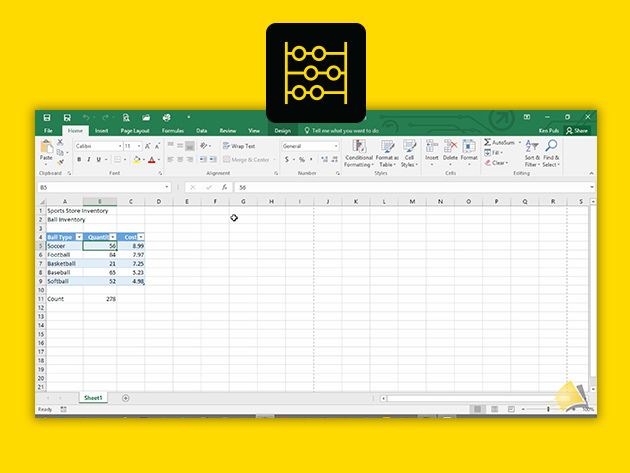
Microsoft Excel is the world’s leading spreadsheet software, used extensively in just about every industry. If there was ever a single software worth learning, it’s Excel. Over 4 broad, CPD-accredited courses, and 49 hours of content, you’ll dive into Microsoft Excel 2013 and 2016, for both PC and Mac, taking your skills from beginner to advanced. Whether you use Excel as a student or a professional, you’ll learn to use all the charting, math, statistical, organizational, and text functions you need to become a bona fide Excel ninja.
- Access 4 courses & 49 hours of content 24/7
- Courses include:
- Microsoft Excel – Basic for PC
- Microsoft Excel – Advanced for PC
- Microsoft Excel – Basic for Mac
- Microsoft Excel – Advanced for Mac
PRODUCT SPECS
Details & Requirements
- Length of time users can access this course: 12 months
- Access options: web streaming, mobile streaming
- Certification of completion included
- Redemption deadline: redeem your code within 30 days of purchase
- Experience level required: all levels
Compatibility
- Internet required

How to connect to a Windows OS when using a Mac
If you need to connect to a Windows PC when using your Mac then you will need the Microsoft Remote Desktop Connection Client for Mac 2.1.1. You can download it here. Here’s some info about the software: Connect to Multiple PC’s New Multiple Session Support gives Mac users simultaneous access to multiple Windows-based PCs or […]
read moreImage Resizer for Windows
The quick and easy way of resizing images in Windows is to use an open source tool called Image Resizer for Windows and it can be download from here: http://imageresizer.codeplex.com/ “Image Resizer for Windows is a utility that lets you resize one or more selected image files directly from Windows Explorer by right-clicking. I created it […]
read moreMay 31, 2011 / by Marco / account, archive, Automatically, BCC, Gmail, gmail account, microsoft, Outlook, Today, WIthin
How to Automatically BCC in Outlook 2010
So today I wanted to automatically add in the BCC my gmail account so that I can easily retrieve and archive sent messages from Outlook 2010. WIthin 4 minutes I was able to get this working thanks to these instructions: http://www.groovypost.com/howto/microsoft/how-to-automatically-bcc-in-outlook-2010/ Now if you’re like me and want to backup your outlook information then you […]
read more