
How to increase the time for Gmail Undo Send to 30 seconds
December 7, 2013 / by Marco / Categories : Gmail, Google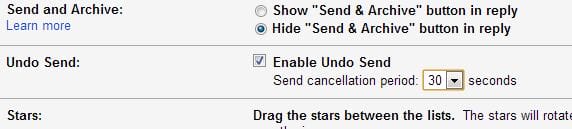
Some of you may or may not be using the Gmail undo send feature. This is a very handy feature for those of us who quickly send emails and then realise they forgot to attach a document or even realised you sent it to the wrong person.
So where is this feature? And how do you increase the time you have to press then undo link?
Firstly, here’s what you need to do to enable Gmail Undo.
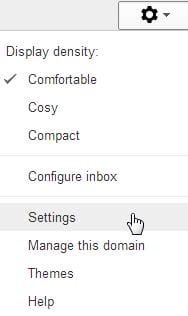
Click on the wheel and click settings
Click on Labs

Go through the list and then find Gmail Undo Send and enable it

Then when you send a message you will see the following links:

Click on Undo if you want to stop sending the email. The email will then go into your Drafts so click on the Drafts label and edit the email.
Now by default, Gmail Undo Send send cancellation period is set to 10 seconds. If you want to increase this to 30 seconds (maximum) then follow these steps:
Click the wheel and then click Settings
In the general tab scroll down to Undo Send and change the period to 30 seconds.
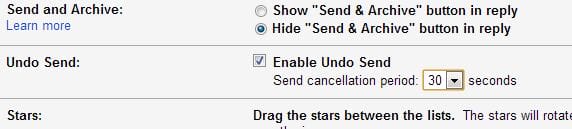
Click Save Changes at the bottom and test. That’s it. Now you have the option to cancel any emails within a period of 30 seconds. Good luck. If you found this helpful make sure you share it.

Marco / admin / 30 Nov
Writing day to day ramblings about making money, business, technology, sharing awesome deals and everything else that I know I'll forget. Follow my personal blog https://marcotran.com.au
I've recently also turned Vegan and started this website Veggie Meals - check it out
"When technology speaks for itself, that is art" - MT
Affiliate Compensated: there are some articles with links to products or services that I may receive a commission.
OTHER ARTICLES YOU MAY LIKE

HOW TO USE SPLIT VIEW IN GOOGLE CHROME
Google Chrome is full of useful features that many people never notice until they appear by accident during everyday browsing. One of those quietly helpful tools is Split View, a feature that makes it much easier to work with two tabs side by side in the same browser window. If you regularly compare documents, read […]
read more
STOP NOISY CALLS: THE ANDROID SETTING YOU SHOULD SWITCH ON TODAY
Phone calls still matter. Whether you’re speaking to a client, checking in with family, or handling something urgent on the move, clarity can make or break the conversation. If you’ve ever found yourself apologising for the construction noise behind you, the wind across your microphone, or the café chatter muddling your words, there’s an Android […]
read more

