
Customize Windows Folder Colors and Icons in One Click with FolderIco – only $9.97!
July 29, 2016 / by Marco / Categories : Business, deals, design, entrepreneur, website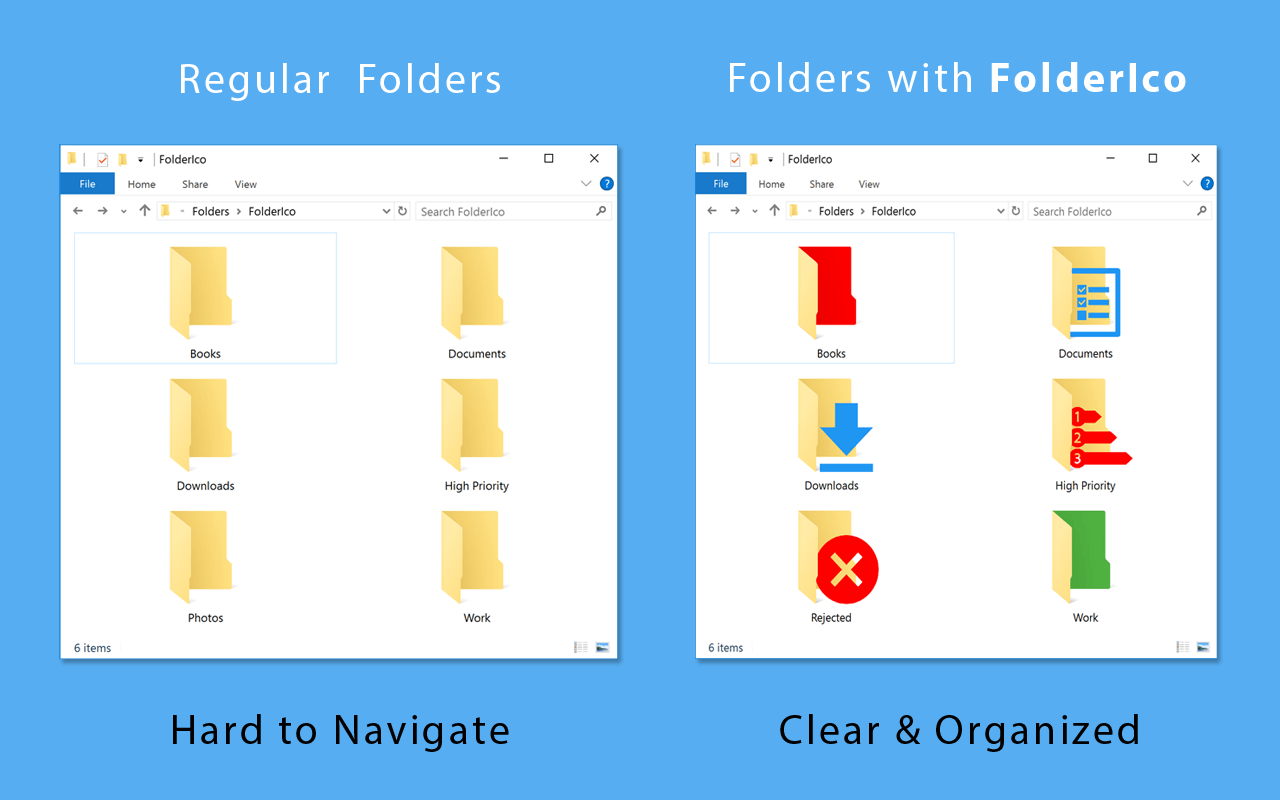

NOW ON: Customize Windows Folder Colors and Icons in One Click with FolderIco – only $9.97!
Expires: August 13, 2016, 11:59 pm EST

Don’t you know how to change standard yellow folder to a colourful and bright one? With FolderIco, give some color to your Windows folders! With just a one click, colorize your folders, and discover a new intuitive way to classify your files. A quick look is now enough to identify the folder you are looking for! You can now classify your folders by priority. Red is an important folder, orange is urgent, green is no action needed… Choose the attributes that you like, so you’ll never delete an important folder in error.
Highlights:
- Organise your folders more easily!
- Just right-click on any folder in Windows Explorer to colorize your folders, and discover a new intuitive way to classify your files.
- Classify your folders by priority! Choose the attributes that you like, so you’ll never delete an important folder in error.
- A fast and light tool! FolderIco uses a native functionality of Windows to be more efficient. Discover its simplicity: with a single right-click on a folder you change it icon!
See how it works:


Check the tutorials here.
Pricing:
FolderIco normally sells for $19.99, but for a limited time only, you can get this incredibly app for only $9.97! That’s a 50% off savings from the regular price!
Click the BUY NOW button and start organizing your folders today!
Deal terms:
- You will receive your download and serial key instantly after completing your purchase.
- Your name and email address will be sent to the vendor, to generate your license key.
- Windows requirements: Windows Vista or later (including Windows 10).
- Licensed on a per user basis. The same license can be installed on multiple computers for the same user.

Marco / admin / 30 Nov
Writing day to day ramblings about making money, business, technology, sharing awesome deals and everything else that I know I'll forget. Follow my personal blog https://marcotran.com.au
I've recently also turned Vegan and started this website Veggie Meals - check it out
"When technology speaks for itself, that is art" - MT
Affiliate Compensated: there are some articles with links to products or services that I may receive a commission.
OTHER ARTICLES YOU MAY LIKE

HOW TO USE SPLIT VIEW IN GOOGLE CHROME
Google Chrome is full of useful features that many people never notice until they appear by accident during everyday browsing. One of those quietly helpful tools is Split View, a feature that makes it much easier to work with two tabs side by side in the same browser window. If you regularly compare documents, read […]
read more
Mootion in 2026: The Essential Tool for Social Media and Presentation Success
Mootion in 2026 revolutionizes social media and presentations with innovative features, enhancing engagement and visual storytelling for impactful communication.
read more

