
V.360° HD Panoramic Camera for $299
November 1, 2016 / by Marco / Categories : Business, deals, design, entrepreneur, website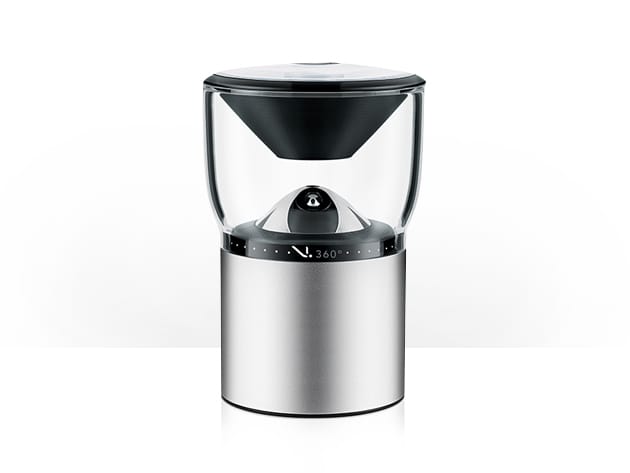


KEY FEATURES
In every video and photo you take on vacation or at the game, there’s always something missing. Actually, it’s about 180 degrees of somethings. The V.360° HD Sports Camera addresses that problem, capturing high resolution, 360 degree video so you can truly remember everything.
- Record, playback & share seamless, 360 degree videos up to 30 frames per second w/ a 60 degree vertical field of view
- Adjust resolution for different scenarios, up to 6480 x 1080 HD
- Capture high resolution, 360 degree, 8MP panoramic images w/ the touch of a button, even while recording video
- Use selectable burst mode to capture 5 sequential panoramic photos
- Create unique videos that turn hours into minutes w/ the built-in time lapse recording feature
- Experience stereo sound thanks to the dual microphones
- Take the V.360° anywhere – it’s built to survive shock, dust, & underwater up to 3′ for 30 minutes
- Grab add-ons to make the V.360° a live video conferencing web camera & more
- Access all 5 camera modes w/ a swipe of your finger using the free app
PRODUCT SPECS
- Dimensions: 56 mm x 101.8 mm
- Weight: .5 lb
- Material: aluminum housing, acrylic lens
- Battery: 2,610 mAh Lithium-Ion
- Battery life: Up to 2 hours of recording
- IP67 water resistant
- GPS
- Barometer
- Accelerometer
- 360 degree video and photo
- 6480 x 1080 HD video up to 30 fps
- Panoramic 8MP photos
- Panoramic 360 degree 6-element glass lens
Includes
- V.360° HD Sports Camera
- V.360° Bluetooth Remote Control
- Microfiber Carrying Pouch
- 2,610 mAh Lithium-Ion Battery
- USB 3.0 Cable
- Charger
- Waterproof Battery Door
- Silicone Sleeve
- Adhesive Dash Mount
- GoPro Mount Adapter
Compatibility
- App is free in the Google Play and App Stores

Marco / admin / 30 Nov
Writing day to day ramblings about making money, business, technology, sharing awesome deals and everything else that I know I'll forget. Follow my personal blog https://marcotran.com.au
I've recently also turned Vegan and started this website Veggie Meals - check it out
"When technology speaks for itself, that is art" - MT
Affiliate Compensated: there are some articles with links to products or services that I may receive a commission.
OTHER ARTICLES YOU MAY LIKE

EASY TYRE PRESSURE SENSOR RESET TUTORIAL | RENAULT KOLEOS & SIMILAR CARS
If you have recently adjusted your tyres, topped up the air pressure, or seen a warning appear on your dashboard, knowing how to reset the tyre pressure monitoring system on a Renault Koleos can save you time and unnecessary worry. The process is quite straightforward once you know where to look in the vehicle menu, […]
read moreHOW TO USE GOOGLE WORKSPACE STUDIO FLOW IN GMAIL FOR SMART EMAIL AUTOMATION
Google keeps slipping new productivity features into Workspace, and sometimes the most useful ones are the tools you almost discover by accident while checking email. That is exactly the case with Studio Flow, a feature that has started appearing inside Gmail and wider Google Workspace environments, and it looks like Google is pushing further into […]
read more

