
ZeroLemon ToughJuice QC 2.0 5-Port Power Bank for $59
March 1, 2017 / by Marco / Categories : Business, deals, design, entrepreneur, website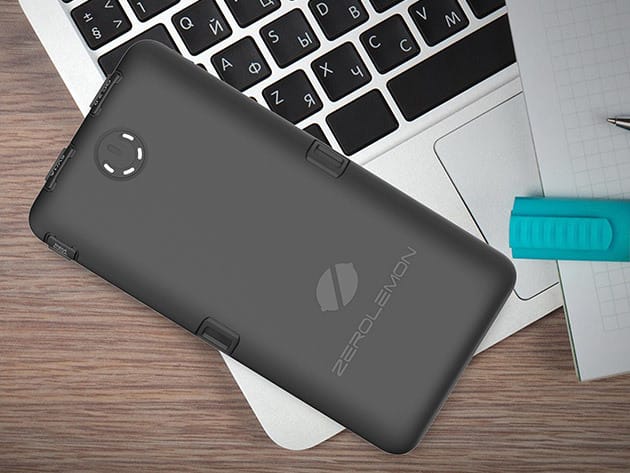


KEY FEATURES
The smartest way to keep your devices juiced up and ready to go – especially when you know you’ll be away from outlets for awhile – is with the ZeroLemon ToughJuice. This high-capacity (30,000mAh), durable external battery holds enough power to charge a smartphone up to ten times, a tablet twice, or even fully charge a MacBook once. With three traditional USB ports, one QuickCharge 2.0 port, and a USB Type-C port, there’s virtually no device that this power bank isn’t compatible with, and can’t charge at a super-fast pace.
- Charge a huge variety of devices fast, including the new, USB Type-C MacBook
- Power devices up fast w/ QC 2.0 charging
- Protect the ToughJuice from damage thanks to the double layer, anti-shock build
- Carry an extra charge anywhere thanks to the portable design
PRODUCT SPECS
Details & Requirements
- Battery capacity: 30,000mAh
- Dimensions: 7.07″ x 3.61″ x 1.3″
- 3 USB outputs: 5V/1A
- QC 2.0 output: 5V/2.4A, 9V/1.67A, 12V/1.35A
- Type-C Output: 5V/2.5A (max)
- Input (Micro-USB and Type-C): 5V/2A (max)
Includes
- ZeroLemon ToughJuice QC 2.0 Power Bank

Marco / admin / 30 Nov
Writing day to day ramblings about making money, business, technology, sharing awesome deals and everything else that I know I'll forget. Follow my personal blog https://marcotran.com.au
I've recently also turned Vegan and started this website Veggie Meals - check it out
"When technology speaks for itself, that is art" - MT
Affiliate Compensated: there are some articles with links to products or services that I may receive a commission.
OTHER ARTICLES YOU MAY LIKE

USE THESE TOOLS TO BUILD YOUR BUSINESS
Building a business has never been short on ambition, but it has often been short on time, budget, and operational headroom. Founders are expected to market like a media team, sell like a seasoned closer, support customers around the clock, manage projects with precision, and still find space to think strategically. That is exactly why […]
read more
HOW TO USE SPLIT VIEW IN GOOGLE CHROME
Google Chrome is full of useful features that many people never notice until they appear by accident during everyday browsing. One of those quietly helpful tools is Split View, a feature that makes it much easier to work with two tabs side by side in the same browser window. If you regularly compare documents, read […]
read more

