
Xtra Drive Lightning Flash Drive with 16GB Micro SD Card for $57
June 23, 2017 / by Marco / Categories : Business, deals, design, entrepreneur, website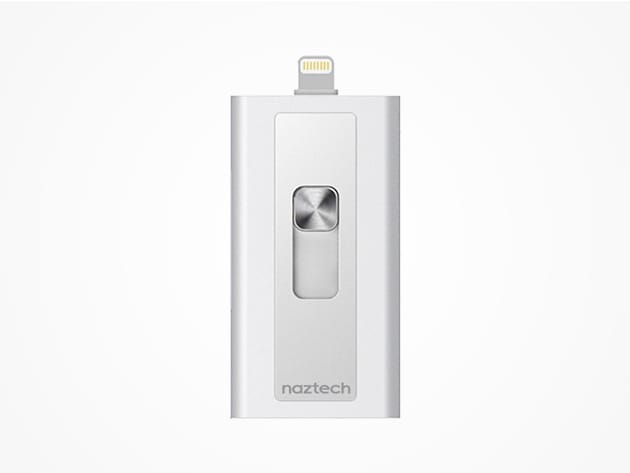


KEY FEATURES
Next time your iPhone or iPad runs low on space, make sure Xtra Drive is there to save the day. This handy, MFi-certified drive plugs directly into your iDevice so you can easily store your music, videos, and photos. Quickly transfer files between your iPhone, iPad, and your desktop or laptop–all with the convenience of this pocket-size portable drive.
- Use any micro SD card up to 128GB
- Free up space on your Apple devices
- Back up your files safely
- Store up to 36,000 songs, 56 hours of video, or 64,000 photos
- Transfer files between your iPhone, iPad, or iPod w/ just the flip of a switch
- Easily fit it in your pocket
- Plug directly into your device w/ the Apple Lightning connector or USB 3.0 connector
- Use the included 16GB micro SD card
PRODUCT SPECS
Details & Requirements
- Apple-certified MFi-certified lightning connector
- Dual USB 3.0
- Sleek, laser-crafted aluminum
- Weight: 0.8 oz
- Dimensions: 1.2”L x .4”W x 2.2”H
- Color: silver
Includes:
- Xtra Drive Lightning Flash Drive
- Removable 16GB micro SD card
Compatibility
- iPhone 5 or later
- iPad Pro
- iPad Air+
- iPad mini+
- iPad (4th generation)
- iPad nano (7th generation)
- iPod touch (5th generation)
- Supports any micro SD card up to 128GB

Marco / admin / 30 Nov
Writing day to day ramblings about making money, business, technology, sharing awesome deals and everything else that I know I'll forget. Follow my personal blog https://marcotran.com.au
I've recently also turned Vegan and started this website Veggie Meals - check it out
"When technology speaks for itself, that is art" - MT
Affiliate Compensated: there are some articles with links to products or services that I may receive a commission.
OTHER ARTICLES YOU MAY LIKE

HOW TO USE SPLIT VIEW IN GOOGLE CHROME
Google Chrome is full of useful features that many people never notice until they appear by accident during everyday browsing. One of those quietly helpful tools is Split View, a feature that makes it much easier to work with two tabs side by side in the same browser window. If you regularly compare documents, read […]
read more
Mootion in 2026: The Essential Tool for Social Media and Presentation Success
Mootion in 2026 revolutionizes social media and presentations with innovative features, enhancing engagement and visual storytelling for impactful communication.
read more


