
How To Create a Firefox Offline Mode Batch File
August 5, 2018 / by Marco / Categories : Business, Software, Technology, TIP AND TRICKS, websiteFor those of you who don’t know, Firefox has an OFFLINE mode where you can use this to display cached content if the website is down. I’ve managed to create a little batch file that checks whether the website is down and then it loads the OFFLINE website (note you must have previously visited the website). Here’s the batch file:
@ECHO OFF
ping -n 1 businesslegions.com | find "TTL" >nul: 2>nul:
if not errorlevel 1 goto :firefox
Echo LOADING WEBSITE IN OFFLINE MODE... PLEASE WAIT ...
"C:\Program Files\Mozilla Firefox\firefox.exe" -offline http://businesslegions.com
exit
:firefox
Echo LOADING WEBSITE ONLINE MODE... PLEASE WAIT ...
"C:\Program Files\Mozilla Firefox\firefox.exe" http://businesslegions.com
exit
You can download the above sample batch file here:

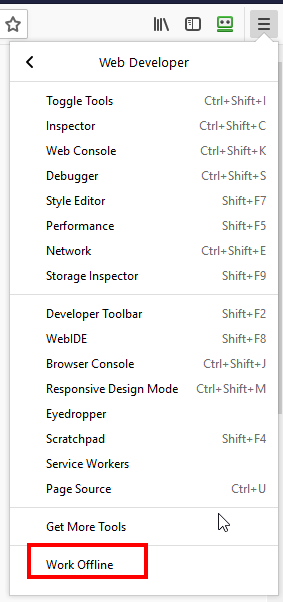
The other option would be to manually select OFFLINE in the Web developer but I prefer to launch this batch file when the computer starts to load a particular website.
Our Sponsors
- Advertise Me Pty Ltd

Digital Signage Solutions
- Fitness Mania
Everything to do with fitness products ranging from gym equipment, fitness clothing, protein powder and lots more.
- My Healthy App
My Healthy App curates all the best and latest mobile health apps.




Marco / admin / 30 Nov
Writing day to day ramblings about making money, business, technology, sharing awesome deals and everything else that I know I'll forget. Follow my personal blog https://marcotran.com.au
I've recently also turned Vegan and started this website Veggie Meals - check it out
"When technology speaks for itself, that is art" - MT
Affiliate Compensated: there are some articles with links to products or services that I may receive a commission.
OTHER ARTICLES YOU MAY LIKE
HOW TO USE GOOGLE WORKSPACE STUDIO FLOW IN GMAIL FOR SMART EMAIL AUTOMATION
Google keeps slipping new productivity features into Workspace, and sometimes the most useful ones are the tools you almost discover by accident while checking email. That is exactly the case with Studio Flow, a feature that has started appearing inside Gmail and wider Google Workspace environments, and it looks like Google is pushing further into […]
read more
USE FUSEBASE TO AUTOMATE TEAMWORK AND COLLABORATION
If your business is growing, your team is juggling too many moving parts, and your client communication is spread across email threads, chat apps, documents, task boards, and endless follow ups, there is a good chance the real problem is not effort but fragmentation. Most businesses do not lose time because people are lazy. They […]
read more

