
CASA HUB i8: 8-in-1 Hub for iMac & iMac Pro for $78
March 19, 2020 / by Marco / Categories : Business, deals, design, entrepreneur, website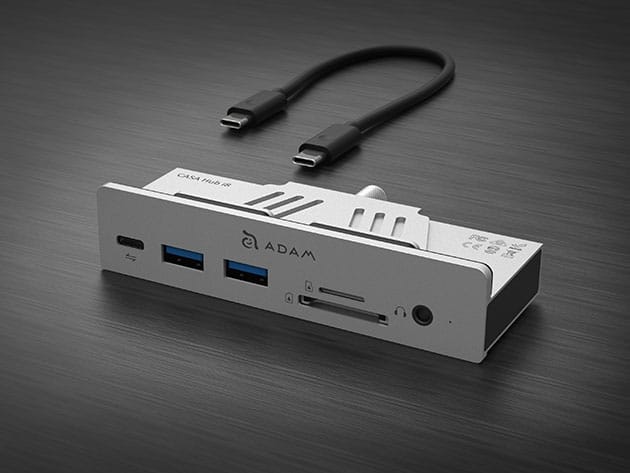


KEY FEATURES
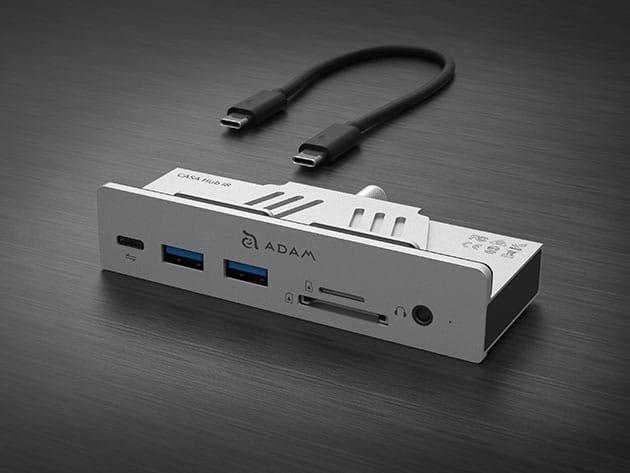
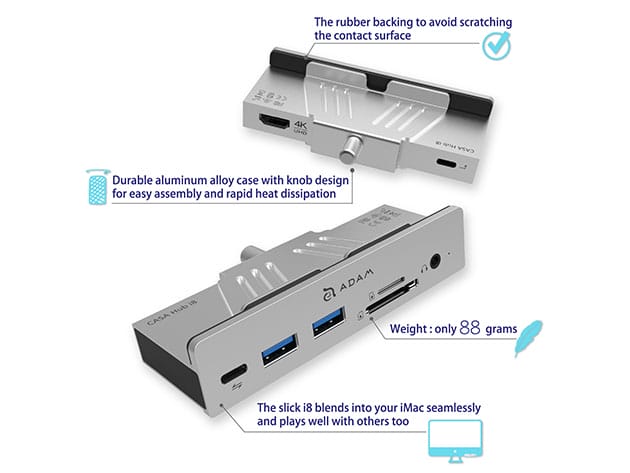
It would be nice if all computer ports could be accessed from the front, however it’s not always the case. Apple puts all iMac ports on the back for a perfectly clean front panel, but just to sacrifice the convenience using USB, video or sound outputs with ease. That’s where the ADAM elements CASA Hub i8 comes in. CASA Hub i8 intelligently converts a USB Type-C port to a USB 3.1 Type-C port, two standard USB 3.1 Type-A ports, an HDMI video port, a pair of SD/microSD memory card readers, and a 48kHz/16-bit stereo earphone jack. Despite its iMac-centric design, the CASA Hub i8 works perfectly with all mainstream computers featuring a USB-C port that conforms to the standard protocol.
- Fully unleash your iMac’s powerful graphic potential w/ the HDMI video port
- Expand your computer’s storage w/ the SD & microSD card slots
- Connect your headphones & create a pleasant music time of your own through the 3.5mm audio jack
- Speed up data transfer up to 5Gbps w/ the USB-C & USB-A ports
- Pair the hub w/ the MacBook USB-C Series, 2018/2019 iPad Pro, iMac/iMac Pro, & PC USB-C laptops
PRODUCT SPECS
Specs
- Color: silver
- Materials: aluminum alloy
- Product dimensions: 4.3″L x 2.2″W x 0.96″H
- Weight: 3.10 oz
- Input: USB-C 3.1 Gen 1 (Connect to host device with USB-C 3.1 Gen 1 cable)
- Output power: USB-A 3.1 Gen 1, up to 5V⎓0.9A
- Transfer speed:
- USB-C 3.1 Gen 1: up to 5 Gbps
- USB-A 3.1 Gen 1: up to 5 Gbps
- Resolution: HDMI up to 4K@30Hz
- Audio output: up to 48kHz, 16 bit stereo
- Certification: CE, FCC, RoHS, BSMI, RCM
- Manufacturer’s 3-year warranty
Compatibility
- SD: SD / SDHC / SDXC / UHS-I Cards
- microSD: microSD / microSDHC / microSDXC / UHS-I Cards
- OS: macOS, Windows 8 / 10, Chrome OS
- Device: MacBook USB-C Series, 2018/2019 iPad Pro, iMac/iMac Pro, PC USB-C Laptop
Includes
- CASA HUB i8: 8-in-1 Hub for iMac & iMac Pro
- USB 3.1 Gen 1 Cable

Marco / admin / 30 Nov
Writing day to day ramblings about making money, business, technology, sharing awesome deals and everything else that I know I'll forget. Follow my personal blog https://marcotran.com.au
I've recently also turned Vegan and started this website Veggie Meals - check it out
"When technology speaks for itself, that is art" - MT
Affiliate Compensated: there are some articles with links to products or services that I may receive a commission.
OTHER ARTICLES YOU MAY LIKE
HOW TO USE GOOGLE WORKSPACE STUDIO FLOW IN GMAIL FOR SMART EMAIL AUTOMATION
Google keeps slipping new productivity features into Workspace, and sometimes the most useful ones are the tools you almost discover by accident while checking email. That is exactly the case with Studio Flow, a feature that has started appearing inside Gmail and wider Google Workspace environments, and it looks like Google is pushing further into […]
read more
USE FUSEBASE TO AUTOMATE TEAMWORK AND COLLABORATION
If your business is growing, your team is juggling too many moving parts, and your client communication is spread across email threads, chat apps, documents, task boards, and endless follow ups, there is a good chance the real problem is not effort but fragmentation. Most businesses do not lose time because people are lazy. They […]
read more

