
CASA Hub S4 USB-C 4-in-1 Hub for Microsoft Surface Go for $49
March 19, 2020 / by Marco / Categories : Business, deals, design, entrepreneur, website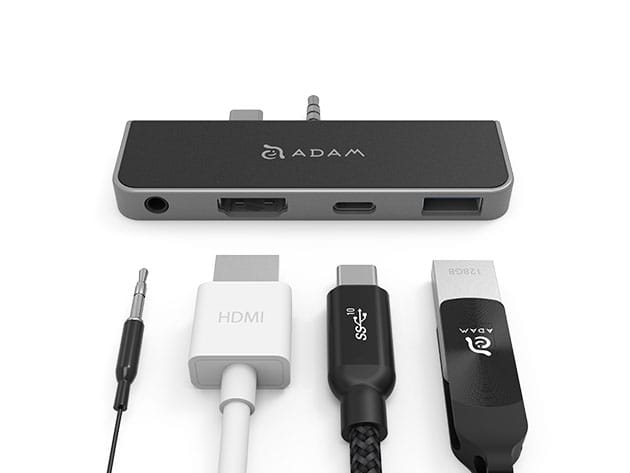


KEY FEATURES
Made for completing daily tasks with the utmost convenience and least bulk, Microsoft released the ultra-thin Surface Go. To maintain its style, Surface Go only has a single USB-C port – not really helpful if you want to charge and connect other devices while working. That’s where the ADAM elements CASA Hub S4 comes in. CASA Hub S4 lets you instantly expand your Surface Go thanks to its USB-A 3.1, USB-C PD 3.0, 4K HDMI, and 3.5mm audio ports. Simply plug the hub to your Surface Go via USB-C input and experience cutting-edge expansion in just a second! CASA Hub is ultra-light at 0.74oz and is 3.4″ long. This multi-port hub sports a beveled design to match the sleekness of your Surface Go.
- Supports data transfer at 5Gbps
- Connect keyboard or other devices via USB-A 3.1 port
- Fast charge your smartphone w/ the PD 3.0 USB-C port
- Mirror your screen to an external monitor or LCD TV via HDMI video output
PRODUCT SPECS
Specs
- Color: black, silver
- Materials: aluminum alloy
- Product dimensions: 0.33″H x 3.46″L x 1.59″W
- Weight: 0.74 oz
- Input interface: USB-C 3.1 Gen 1
- Output interface
- USB-C 3.1 Gen 1, PD 3.0 Charging Female (PD pass-through up to 40W)
- USB-A 3.1 Gen 1 Female
- HDMI Std.A
- 3.5mm audio jack
- Source power: 40W
- Input power: USB-C PD 3.0, up to 20V = 2A
- Output power:
- USB-C 3.1 Gen 1, up to 5V = 0.9A
- USB-A 3.1 Gen 1, up to 5V = 0.9A
- Transfer speed:
- USB-C 3.1 Gen 1: up to 5Gbps
- USB-A 3.1 Gen 1: up to 5Gbps
- Resolution: HDMI, 4K@30Hz
- Audio output: 3.5mm audio jack with up to 48kHz, 16 bit stereo
- OS compatibility: Windows 10
- Certification: CE, FCC, RoHS, BSMI, RCM
- Manufacturer’s 3-year warranty
Includes
- CASA Hub S4 USB-C 4-in-1 Hub for Microsoft Surface Go
- Manual

Marco / admin / 30 Nov
Writing day to day ramblings about making money, business, technology, sharing awesome deals and everything else that I know I'll forget. Follow my personal blog https://marcotran.com.au
I've recently also turned Vegan and started this website Veggie Meals - check it out
"When technology speaks for itself, that is art" - MT
Affiliate Compensated: there are some articles with links to products or services that I may receive a commission.
OTHER ARTICLES YOU MAY LIKE
HOW TO USE GOOGLE WORKSPACE STUDIO FLOW IN GMAIL FOR SMART EMAIL AUTOMATION
Google keeps slipping new productivity features into Workspace, and sometimes the most useful ones are the tools you almost discover by accident while checking email. That is exactly the case with Studio Flow, a feature that has started appearing inside Gmail and wider Google Workspace environments, and it looks like Google is pushing further into […]
read more
USE FUSEBASE TO AUTOMATE TEAMWORK AND COLLABORATION
If your business is growing, your team is juggling too many moving parts, and your client communication is spread across email threads, chat apps, documents, task boards, and endless follow ups, there is a good chance the real problem is not effort but fragmentation. Most businesses do not lose time because people are lazy. They […]
read more

