
MAKERbuino Educational DIY Game Console (Standard Kit) for $69
March 19, 2020 / by Marco / Categories : Business, deals, design, entrepreneur, website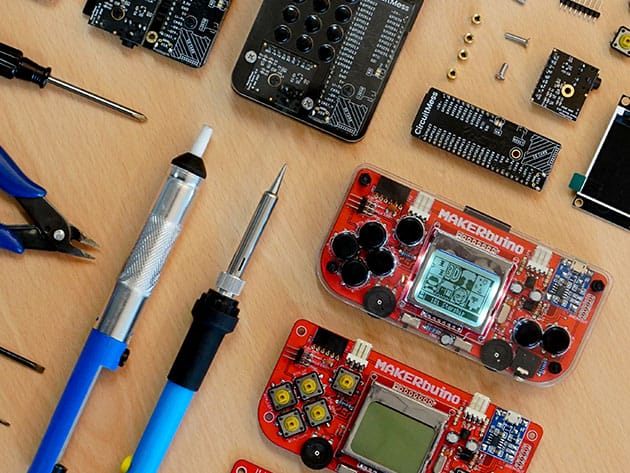



KEY FEATURES
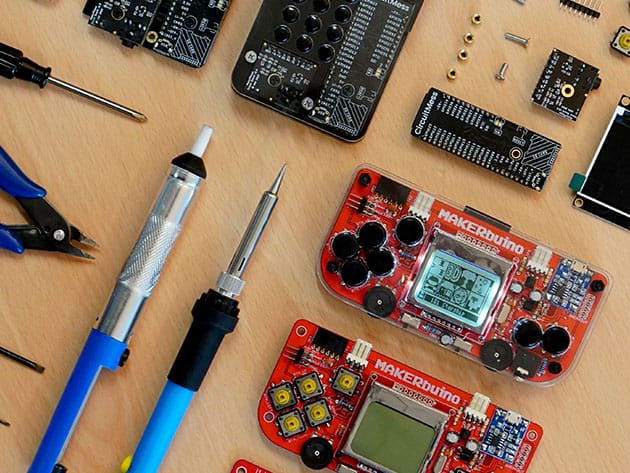
In this new age, most kids spend most of their time watching YouTube videos or playing games on smartphones and tablets. Why don’t we change things a bit? CircuitMess brings you MAKERbuino, a little educational, open-source handheld game device that children can build on their own. Complete with electronic components, modules, and accessories, this console kit motivates children to explore, learn, and create something new in a fun and interesting way. This device is based on Arduino UNO, making it compatible with lots of hardware expansion modules and fully customizable. Building the console may take up to 5 hours, so you might want to help your kids get started and have them learn through the process.
As Seen On: Forbes, BBC, Mashable!
- Based on Arduino UNO, this console is compatible w/ lots of hardware expansion modules, fully-customizable & unique
- Build guide helps not only to assemble things but also teaches basic electronics, soldering, & more
- Can be programmed in Arduino IDE, the most popular programming environment for makers
- Connects w/ link cables, exchanges data, & supports multiplayer gaming
- Comes w/ an SD card that is preloaded with numerous fun retro games
- Get the full build guide here
PRODUCT SPECS
Specs
- Standard kit
- Product dimensions: 5.12″ x 2.36″ x 0.98″
- CPU: ATmega328 @ 16MHz (same MCU used in Arduino UNO)
- Display: Nokia 5110 84×48 monochrome graphic LCD w/ white backlight (adjustable with a built in potentiometer)
- Sound:
- 0.5W speaker with 4-channel audio generation
- 3.5mm headphone connector
- hardware volume control
- Input: 7 super-clicky pushbuttons with replaceable button caps (D-pad + ABC buttons)
- Storage:
- 32kB of FLASH program memory
- 2kB of RAM
- Up to 2GB SD card for loading & saving programs (HEX files) and data (128MB card included)
- Communication: Serial UART port, i2c, SPI
- Power: single cell LiPo, 3.7V, 600mAh, charged with regular micro USB smartphone charger
- Manufacturer’s 1-year warranty
Tools Needed
- Diagonal cutter pliers
- Screwdriver
- Some solder
- Nose pliers
- Soldering iron
Includes
- MAKERbuino PCB
- MAKERbuino casing
- 84×84 monochrome LCD
- Main microcomputer module
- Sound module
- USB battery charger board
- 128MB Micro SD card + SD adapter
- A bag with other tiny electronic components such as pushbuttons and colored button caps

Marco / admin / 30 Nov
Writing day to day ramblings about making money, business, technology, sharing awesome deals and everything else that I know I'll forget. Follow my personal blog https://marcotran.com.au
I've recently also turned Vegan and started this website Veggie Meals - check it out
"When technology speaks for itself, that is art" - MT
Affiliate Compensated: there are some articles with links to products or services that I may receive a commission.
OTHER ARTICLES YOU MAY LIKE

REVIEWING AND UNBOXING THE TOOCKI USB-C RIGHT ANGLE 1.2M CABLE
USB C cables are among the most ordinary accessories we own, yet they can make a surprisingly noticeable difference to how comfortable our devices are to use while charging. The Toocki USB C right angle cable is a good example of a simple accessory that tries to solve a very common irritation, because instead of […]
read more
QUICK FIX TO CHANGE THE MAX SELL POWER TO LESS THAN 500W ON THE DEYE INVERTER
There are many reasons a home owner or installer might want to place a tight cap on how much solar power is exported to the public grid. Some households live under a strict export cap imposed by their local distribution network operator, others want to reduce export to focus on self consumption and battery charging, […]
read more

