
Plevo: The Runner – Smart Luggage Set for $389
March 19, 2020 / by Marco / Categories : Business, deals, design, entrepreneur, website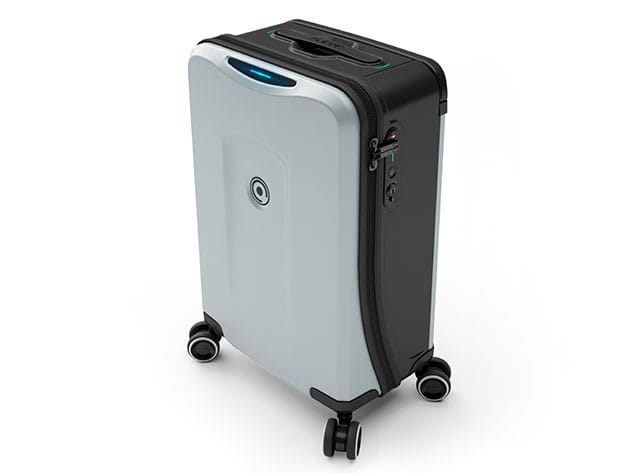


KEY FEATURES
Hop on your next flight with Plevo Runner! Perfect for all travelers seeking a stylish carry on with state-of-the-art technology, the Runner is fully-loaded with convenient features such as Smart Lock (Face ID, Touch ID, Morse Code), Built-in Weight Sensors, Removable wheels, Distance Alerts, and a Removable Battery Pack, all connected to the Plevo App. It also comes with a BONUS removable sleeve for your laptop and an easy-access for your essentials. With cutting-edge features that offer practicality, mobility, and significant security, The Runner is the luggage that you need.
- Take advantage of all the electronic functions by connecting to the PLEVO App
- Charge all your devices, even new gen laptops w/ the removable battery pack
- Breeze through the airport by being able to access your electronics without having to open your bag
- Enjoy full mobility thanks to the 360° fully silent detachable wheels
- Open your suitcase w/ Face ID, Touch ID, & Morse Code
- Know how much your luggage weighs to prevent baggage fees w/ the built-in weight sensors
Successfully funded on Kickstarter at $324k+
PRODUCT SPECS
Specs
- Color: silver
- Finish: matte
- Materials: polycarbonate, polypropylene, aluminum
- Size: 20″ (carry-on)
- Product dimensions: 20″H x 13.9″L x 9″W
- Weight: 10.14 lbs (9.26 lbs without wheels
- Weight sensors, synced to flight details
- Smart lock: Face ID, Touch ID, Morse Code
- Distance alerts
- Automatic lock on distance
- 65.6 Bluetooth range
- Removable battery pack:
- Input: Micro, Type-C
- Output: Type-C, QC 3.0
- Capacity: 8,000mAh/ 29.6Wh
- Removable sleeve: Macbook 13″
- 360° fully silent removable wheels
- Compliant with Airline Regulations
- App: PLEVO (App Store or Google Play)
- PLEVO Warranty Policy
Includes
- Luggage (Silver)
- Removable wheels
- Removable battery pack
- Sleeve
- QR Manual
- Key
- Stickers

Marco / admin / 30 Nov
Writing day to day ramblings about making money, business, technology, sharing awesome deals and everything else that I know I'll forget. Follow my personal blog https://marcotran.com.au
I've recently also turned Vegan and started this website Veggie Meals - check it out
"When technology speaks for itself, that is art" - MT
Affiliate Compensated: there are some articles with links to products or services that I may receive a commission.
OTHER ARTICLES YOU MAY LIKE

EASY TYRE PRESSURE SENSOR RESET TUTORIAL | RENAULT KOLEOS & SIMILAR CARS
If you have recently adjusted your tyres, topped up the air pressure, or seen a warning appear on your dashboard, knowing how to reset the tyre pressure monitoring system on a Renault Koleos can save you time and unnecessary worry. The process is quite straightforward once you know where to look in the vehicle menu, […]
read moreHOW TO USE GOOGLE WORKSPACE STUDIO FLOW IN GMAIL FOR SMART EMAIL AUTOMATION
Google keeps slipping new productivity features into Workspace, and sometimes the most useful ones are the tools you almost discover by accident while checking email. That is exactly the case with Studio Flow, a feature that has started appearing inside Gmail and wider Google Workspace environments, and it looks like Google is pushing further into […]
read more

