
Lenovo Tab 3 Essential 8″ 16GB – Black (Refurbished: Wi-Fi + Cellular) for $74
April 2, 2020 / by Marco / Categories : Business, deals, design, entrepreneur, website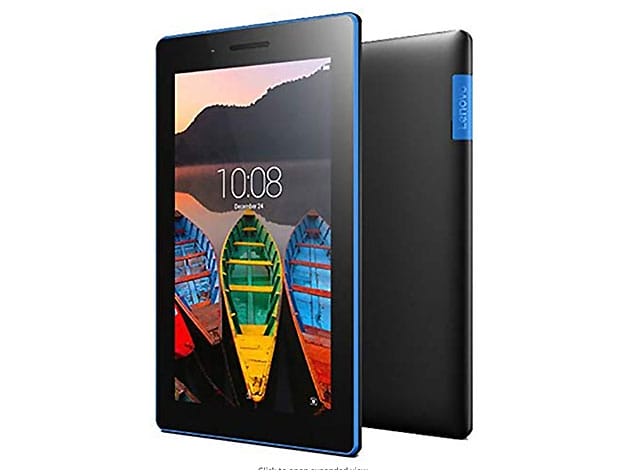


KEY FEATURES
Made for pure enjoyment and great convenience, the Tab 3 Essential is one incredible tablet with 1280×800 hi-res display, MediaTek 1.0GHz quad-core processor, dual cameras, and 4,290mAh battery. Work, play, or just tap away. The beautiful 8″ touch screen display makes every image appear closer, clearer, and sharper. Match it with Dolby®Atomos audio enhancement for louder, more natural, and distortion-free sound for a complete streaming experience. Powered by a 4,290 mAh battery, this pocket-size tablet offers up to 10 hours of battery on a single charge, letting you enjoy uninterrupted binge-watching, gaming, or social media without recharging.
- 8″ HD display: Watch your favorite TV shows on Amazon, Hulu, or Netflix
- Dolby® Atomos: Turn your tablet into a mobile entertainment hub w/ immersive audio
- Razor-thin design: Take anywhere w/ a slim design that’s only 0.35″ thick
- MediaTek® 1.0 GHz quad-core processor: Get more done faster w/ an ultra-powerful processor
- Model year: 2016
Refurbished Rating
This product is listed with a grade “B” rating. It may have light scuffing on the bevel/case or light scratches/dents on the body.
PRODUCT SPECS
Specs
- Color: black
- Finish: blue
- Materials: plastic, glass
- Size: 8″
- Product dimensions: 8.27″ x 4.92″ x 0.35″
- Weight: 0.72 lb
- Processor: MediaTek MT8161p (4C, 1.0GHz)
- Graphics: Integrated Graphics
- Memory: 1GB Soldered
- Display: 8″ HD (1280×800) IPS
- Multi-touch: 5-point multi-touch
- Storage: 16GB
- WLAN: 802.11 b/g/n
- WWAN: optional 4G LTE connectivity
- SIM card: 2x micro SIM slot, dual micro SIM slot (4G only)
- G-sensor
- Battery: 4,290mAh
- Battery life: up to 8 hours
- RoHS compliant
- Model number: ZA170001US
- Aftermarket 30-day parts and labor warranty from third party
Includes
- Lenovo Tab 3 Essential 8″ 16GB – Black (Refurbished: Wi-Fi + Cellular)
- Power adapter

Marco / admin / 30 Nov
Writing day to day ramblings about making money, business, technology, sharing awesome deals and everything else that I know I'll forget. Follow my personal blog https://marcotran.com.au
I've recently also turned Vegan and started this website Veggie Meals - check it out
"When technology speaks for itself, that is art" - MT
Affiliate Compensated: there are some articles with links to products or services that I may receive a commission.
OTHER ARTICLES YOU MAY LIKE
HOW TO USE GOOGLE WORKSPACE STUDIO FLOW IN GMAIL FOR SMART EMAIL AUTOMATION
Google keeps slipping new productivity features into Workspace, and sometimes the most useful ones are the tools you almost discover by accident while checking email. That is exactly the case with Studio Flow, a feature that has started appearing inside Gmail and wider Google Workspace environments, and it looks like Google is pushing further into […]
read more
USE FUSEBASE TO AUTOMATE TEAMWORK AND COLLABORATION
If your business is growing, your team is juggling too many moving parts, and your client communication is spread across email threads, chat apps, documents, task boards, and endless follow ups, there is a good chance the real problem is not effort but fragmentation. Most businesses do not lose time because people are lazy. They […]
read more

