
Acer C720P 11.6″ 16GB Touchscreen Chromebook – Black (Refurbished) for $109
April 3, 2020 / by Marco / Categories : Business, deals, design, entrepreneur, website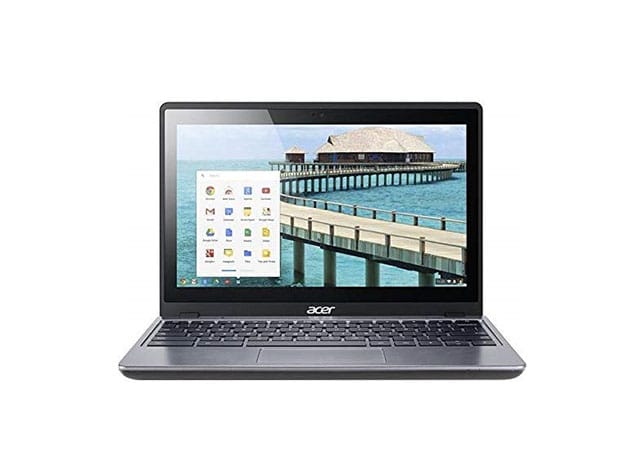


KEY FEATURES
If you’re looking for a modern laptop with uncompromised speed, performance, and aesthetic, the Acer C720P is the laptop for you/. This Chromebook is powered by a dual-core 1.4GHz Intel Celeron processor, Intel HD Graphics, and Chrome OS, giving you seamless browsing, fast boot-up, Google-integrated apps, hassle-free maintenance, and 7.5 hours of battery time. Touch-enabled, C720P lets you tap, drag, pinch, and do multi-finger gestures to control the 11.6″ LED display. This Chromebook sports a sleek and simple black plastic housing at 0.8″ thin. With Wi-Fi and Bluetooth connectivity, this refurbished Chromebook lets you be productive anywhere.
- Google Chrome OS: Be highly productive w/ fast Google-integrated apps
- 1.4 GHz Intel Celeron: Enjoy fast & smooth browsing
- 16GB SSD: Save your essential files in generous hard drive storage
- Multi-touch display: Tap, drag, pinch, & do multi-finger gestures to control the 11.6″ LED display
- Model year: 2014
Refurbished Rating
This product is listed with a grade “B” rating. It may have light scuffing on the bevel/case or light scratches/dents on the body.
PRODUCT SPECS
Specs
- Color: black
- Materials: glass, plastic
- Product dimensions: 11.3″W x 8″D x 0.8″H
- Operating system: Google Chrome OS
- CPU: Intel Celeron 2955U 1.4GHz
- Number of cores: dual-core
- Intel Smart Cache,/li>
- Memory speed: 1600 MHz
- RAM: 4GB DD3L SDRAM
- Storage: 16GB SSD
- LED backlight
- Image aspect ratio: 16:9
- Multi-touch display
- Resolution: 1280 x 720
- Sound: stereo speakers, microphone
- Input: keyboard, touchpad
- Connectivity: Wi-Fi, Bluetooth 4.0
- Battery time: 7.5 hours
- Model number: C720P-2625
- Aftermarket 30-day parts and labor warranty from third party
Includes
- Acer C720P 11.6″ 16GB Touchscreen Chromebook – Black (Refurbished)
- Charging cable

Marco / admin / 30 Nov
Writing day to day ramblings about making money, business, technology, sharing awesome deals and everything else that I know I'll forget. Follow my personal blog https://marcotran.com.au
I've recently also turned Vegan and started this website Veggie Meals - check it out
"When technology speaks for itself, that is art" - MT
Affiliate Compensated: there are some articles with links to products or services that I may receive a commission.
OTHER ARTICLES YOU MAY LIKE

EASY TYRE PRESSURE SENSOR RESET TUTORIAL | RENAULT KOLEOS & SIMILAR CARS
If you have recently adjusted your tyres, topped up the air pressure, or seen a warning appear on your dashboard, knowing how to reset the tyre pressure monitoring system on a Renault Koleos can save you time and unnecessary worry. The process is quite straightforward once you know where to look in the vehicle menu, […]
read moreHOW TO USE GOOGLE WORKSPACE STUDIO FLOW IN GMAIL FOR SMART EMAIL AUTOMATION
Google keeps slipping new productivity features into Workspace, and sometimes the most useful ones are the tools you almost discover by accident while checking email. That is exactly the case with Studio Flow, a feature that has started appearing inside Gmail and wider Google Workspace environments, and it looks like Google is pushing further into […]
read more


