
MindMaster Mind Mapping Software: Perpetual License for $49
May 3, 2020 / by Marco / Categories : Business, deals, design, entrepreneur, website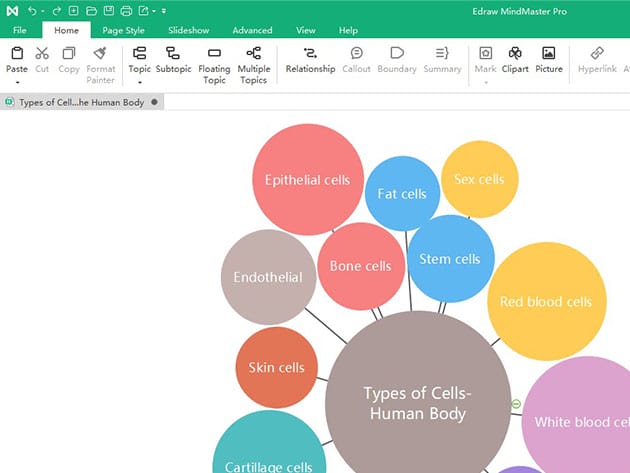


KEY FEATURES
MindMaster is a versatile, user-friendly, and professional mind mapping tool, designed for creating fresh new visual innovations, integrating your bullet points to structure an overall mind map. It is convenient and helpful for you to use MindMaster to sort out your thoughts or ideas in order to find solutions to problems. MindMaster provides you with 12 different map structures, 33 themes, and 700+ cliparts, all of which you can use and customize to tailor your mind maps with endless possibilities. With just a few clicks, you can effortlessly present your stunning mind map in Microsoft PowerPoint file.
★ ★ ★ ★ ★ ★ ★ ★ ★
★
- Choose the best structure, style, theme, & colors to express your ideas
- Add more information such as callouts, relationships, summaries, marks, notes, hyperlinks & so on
- Record ideas more effectively w/ the Brainstorming Mode
- Switch to Gantt view to track task start/end date & progress
- Present your stunning mind map in MS PowerPoint file w/ just a few clicks
- Works on any PC operating system: Windows, Mac, or Linux
WRCBtv: “MindMaster is one of the Edrawsoft groups, described “as the best mind mapping design tool,” developed to allow anyone to visualize and design mind maps easily with numerous customized templates.”
PRODUCT SPECS
System Requirements
- Windows Vista/7/8/10 (32bit/64 bit))
- Mac OS X 10.10 or later
- Linux: Debian, Ubuntu, Fedora, CentOS, OpenSUSE, Mint, Knoppix, RedHat, Gentoo & more
- 1 GB of RAM and 800 MB of hard disk space
- Intel 1st Gen processor or later
- 1024 x 768 or higher resolution
Important Details
- Length of access: lifetime
- Each serial number can be used only one time
- MindMaster Perpetual License supports only MindMaster desktop (Windows, Mac & Linux)
- Web and Mobile versions are NOT included
- 2 years free upgrades service is provided with MindMaster Perpetual License
- Redemption deadline: redeem your code within 30 days of purchase
- Max number of devices: 2
- Access options: desktop
- Software version: 7.3
- Updates included
What’s New?
- Various types of maps
- Superior file compatibility
- Multiple device support

Marco / admin / 30 Nov
Writing day to day ramblings about making money, business, technology, sharing awesome deals and everything else that I know I'll forget. Follow my personal blog https://marcotran.com.au
I've recently also turned Vegan and started this website Veggie Meals - check it out
"When technology speaks for itself, that is art" - MT
Affiliate Compensated: there are some articles with links to products or services that I may receive a commission.
OTHER ARTICLES YOU MAY LIKE
HOW TO USE GOOGLE WORKSPACE STUDIO FLOW IN GMAIL FOR SMART EMAIL AUTOMATION
Google keeps slipping new productivity features into Workspace, and sometimes the most useful ones are the tools you almost discover by accident while checking email. That is exactly the case with Studio Flow, a feature that has started appearing inside Gmail and wider Google Workspace environments, and it looks like Google is pushing further into […]
read more
USE FUSEBASE TO AUTOMATE TEAMWORK AND COLLABORATION
If your business is growing, your team is juggling too many moving parts, and your client communication is spread across email threads, chat apps, documents, task boards, and endless follow ups, there is a good chance the real problem is not effort but fragmentation. Most businesses do not lose time because people are lazy. They […]
read more


