
Connect-it BBQ Tool Set for $39
May 22, 2020 / by Marco / Categories : Business, deals, design, entrepreneur, website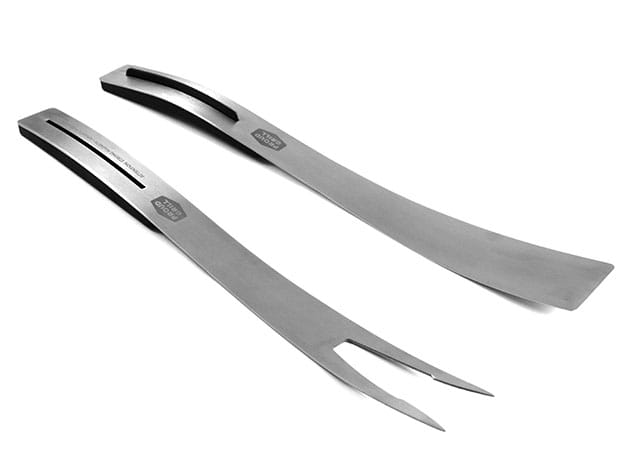


KEY FEATURES
Juggling utensils while cooking barbecues can be so much work. Why not merge them in just one tool? The Connect-it BBQ Tool Set features a spatula and a fork with elegant design and high-quality stainless steel construction. With magnetic handles, you can connect these two and use them for 4 different functions: individual, tong, server, or for storage. It can even hang from your metal smoker or grill side shelf. The Connect-it BBQ Tool versatile handle system makes them ideal for the backyard grill enthusiast.
Instructions
- Use the Spatula or Fork individually
- To create Tongs, put Spatula on surface face up w/ the black magnetic handle underneath & then place the Fork on top with the magnetic handle on the outside
- To create a Server tool, put Spatula on surface face up w/ magnetic handle underneath, then place the Fork with the black magnetic handle side down on top of the Spatula
- To store, place the Fork on surface face up w/ the black magnetic handle underneath & then place the Spatula with the magnetic handle side down on top of the Fork
WARNINGS
- Strong magnets. Keep away from any object sensitive to a magnetic field
- Fork tips are sharp. Keep away from children; keep fingers on the outside of the handles to avoid pinching
PRODUCT SPECS
Specs
- Materials: stainless steel
- Dimensions: 20.8″H x 1.3″L x 5.5″
- Spatula & fork
- Magnetic handles
- Elegant design
- 4 uses
- Manufacturer’s 1-year warranty under normal use
Includes
- 1x Spatula
- 1x Fork

Marco / admin / 30 Nov
Writing day to day ramblings about making money, business, technology, sharing awesome deals and everything else that I know I'll forget. Follow my personal blog https://marcotran.com.au
I've recently also turned Vegan and started this website Veggie Meals - check it out
"When technology speaks for itself, that is art" - MT
Affiliate Compensated: there are some articles with links to products or services that I may receive a commission.
OTHER ARTICLES YOU MAY LIKE

EASY TYRE PRESSURE SENSOR RESET TUTORIAL | RENAULT KOLEOS & SIMILAR CARS
If you have recently adjusted your tyres, topped up the air pressure, or seen a warning appear on your dashboard, knowing how to reset the tyre pressure monitoring system on a Renault Koleos can save you time and unnecessary worry. The process is quite straightforward once you know where to look in the vehicle menu, […]
read moreHOW TO USE GOOGLE WORKSPACE STUDIO FLOW IN GMAIL FOR SMART EMAIL AUTOMATION
Google keeps slipping new productivity features into Workspace, and sometimes the most useful ones are the tools you almost discover by accident while checking email. That is exactly the case with Studio Flow, a feature that has started appearing inside Gmail and wider Google Workspace environments, and it looks like Google is pushing further into […]
read more

