
Clonezilla Live USB
July 30, 2012 / by Marco / Categories : Technology
Clonezilla is an open source tool similar to Norton Ghost. It’s all text based and I’ve been using it for years and works well. But every time I create a Live USB boot drive, I seem to get it wrong all the time so I decided to create this post.
What is Clonezilla?
You’re probably familiar with the popular proprietary commercial package Norton Ghost®. The problem with these kind of software packages is that it takes a lot of time to massively clone systems to many computers. You’ve probably also heard of Symantec’s solution to this problem, Symantec Ghost Corporate Edition® with multicasting. Well, now there is an OpenSource clone system (OCS) solution called Clonezilla with unicasting and multicasting!
Clonezilla, based on DRBL, Partclone and udpcast, allows you to do bare metal backup and recovery. Two types of Clonezilla are available, Clonezilla live and Clonezilla SE (server edition). Clonezilla live is suitable for single machine backup and restore. While Clonezilla SE is for massive deployment, it can clone many (40 plus!) computers simultaneously. Clonezilla saves and restores only used blocks in the harddisk. This increases the clone efficiency. At the NCHC’s Classroom C, Clonezilla SE was used to clone 41 computers simultaneously. It took only about 10 minutes to clone a 5.6 GBytes system image to all 41 computers via multicasting!
Instructions
The instructions that is on their website is very detailed. If you follow them step by step you won’t go wrong. It’s very straight forward and simple to use. Here’s just a quick summary of what you need to do:
– Download the latest iso image
– Download Tuxboot
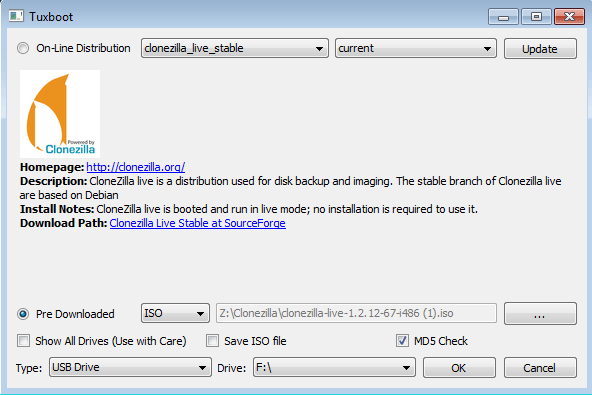
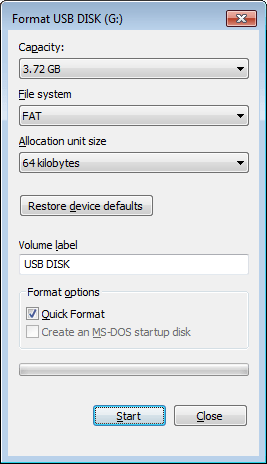
Now grab a spare USB drive. Anything over 2GB would do. Before you use this tool format your USB drive to FAT. This is one of the steps I keep forgetting. <- DON’T FORGET THIS!!
Then run the program and it will automatically create the USB Boot drive.

Marco / admin / 30 Nov
Writing day to day ramblings about making money, business, technology, sharing awesome deals and everything else that I know I'll forget. Follow my personal blog https://marcotran.com.au
I've recently also turned Vegan and started this website Veggie Meals - check it out
"When technology speaks for itself, that is art" - MT
Affiliate Compensated: there are some articles with links to products or services that I may receive a commission.
OTHER ARTICLES YOU MAY LIKE

REVIEWING AND UNBOXING THE TOOCKI USB-C RIGHT ANGLE 1.2M CABLE
USB C cables are among the most ordinary accessories we own, yet they can make a surprisingly noticeable difference to how comfortable our devices are to use while charging. The Toocki USB C right angle cable is a good example of a simple accessory that tries to solve a very common irritation, because instead of […]
read more
SUPABASE BACKUP TUTORIAL: USE DBEAVER TO EXPORT YOUR DATABASE SAFELY
If you are building anything serious on Supabase, whether that is a client portal, a SaaS app, an internal dashboard, or even a small side project that is starting to get traction, having a reliable database backup process is one of those tasks that quickly moves from optional to essential. Supabase makes a lot of […]
read more

