
Automatic Screenshots using IcyScreen
March 6, 2015 / by Marco / Categories : Business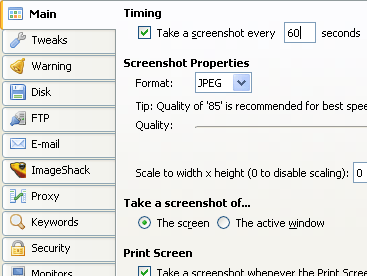
For many of you taking a screenshot is straight forward – you press the Print Screen button and then open up an image editor, paste the screen capture and then save the file. Simple right? But what happens if you want to automate this process so that you have a screenshot every minute or every hour? What if you wanted to capture your screen when you or someone who is using your computer types a certain keyword?
I recently found the answer. It’s called IcyScreen and it’s the ultimate Windows software tool for automatically taking screenshots. There are many uses for this type of software but the reason why I needed it was for system monitoring. I needed to capture the screen on our server that was running a live monitoring tool and I wanted it email it to me so I can check the status without having to login to the server. IcyScreen solved this problem. The tool allows you to capture the whole screen (or even part of a screen… or even select which screen if you had multiple connected – yes there’s lots of features) every 30 minutes and then email it to me. That way I could check the status of the live monitoring tool on my mobile phone. Now if you don’t want to email the image, you have the option to save it locally on the hard disk, FTP the file or even Save it on ImageShack.
If you want to capture your screen so you can recall what tasks or work you were doing at a specific time then this is the perfect solution. The software can even protect the configuration settings by using a password so you know that no one will be able to make any changes.
So far I have found the software to be reliable and support from the developers is very responsive. There are too many features the software provides so I would suggest go to the website and have a read here.
You can also download and use the trial version for 30 Days. There is also a money back guarantee if you’re not happy with the software so you’ve got nothing to lose.


Marco / admin / 30 Nov
Writing day to day ramblings about making money, business, technology, sharing awesome deals and everything else that I know I'll forget. Follow my personal blog https://marcotran.com.au
I've recently also turned Vegan and started this website Veggie Meals - check it out
"When technology speaks for itself, that is art" - MT
Affiliate Compensated: there are some articles with links to products or services that I may receive a commission.
OTHER ARTICLES YOU MAY LIKE

USING THE LATEST CLAUDE MODEL TO BUILD GREAT TOOLS
If you have ever had an idea for a small tool but stopped because coding felt too hard, the latest Claude model makes that gap much smaller. You can now describe what you want in plain English, ask Claude to plan it, build the first version, improve the design, write the logic, test the workflow, […]
read more
REVIEWING AND UNBOXING THE TOOCKI USB-C RIGHT ANGLE 1.2M CABLE
USB C cables are among the most ordinary accessories we own, yet they can make a surprisingly noticeable difference to how comfortable our devices are to use while charging. The Toocki USB C right angle cable is a good example of a simple accessory that tries to solve a very common irritation, because instead of […]
read more

