
WorkspacePro: Multiple App Launcher for Mac for $7
March 19, 2020 / by Marco / Categories : Business, deals, design, entrepreneur, website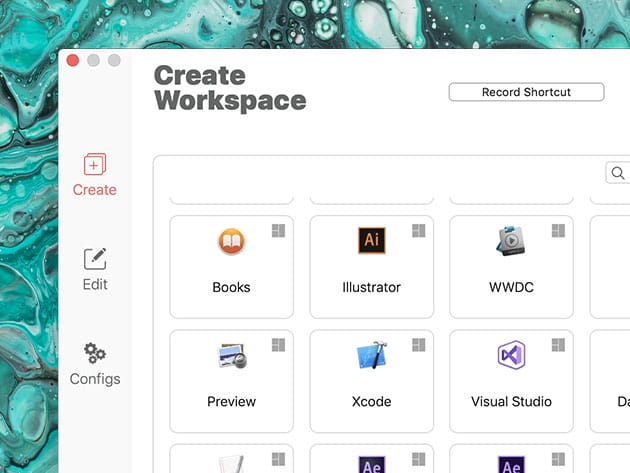


KEY FEATURES
Switching through apps, especially when you’re meeting strict deadlines, can be a handful. WorkSpacePro helps you get more tasks done without doing any more complex work. This program allows you to launch and close a bunch of macOS apps just with a shortcut or a single click. With a variety of features, WorkSpacePro gives you more working flexibility. Regroup apps according to their purposes such as work, editing, communication, and more. You can even customize in which position and size apps’ windows will be launched as well as hide launched apps and force terminate unresponsive programs. With WorkSpacePro, you’ll have a cleaner Mac desktop, save time, and skyrocket your productivity.
#1 Product of the Day on Product Hunt!
- Select which apps you want to open in your workspace
- Use shortcut or button in the menu bar to open all apps of workspace
- Define in which position & size you want the apps to be launched
- Force terminate apps if they do not respond
- Hide launched apps or create new instances of apps if one is already running
PRODUCT SPECS
System Requirements
- macOS 10.14 Mojave or later
Important Details
- Length of access: lifetime
- This plan is only available to new users
- Redemption deadline: redeem your code within 30 days of purchase
- Max number of devices: 1
- Access options: desktop
- Software version: 2.1.3
- Updates included

Marco / admin / 30 Nov
Writing day to day ramblings about making money, business, technology, sharing awesome deals and everything else that I know I'll forget. Follow my personal blog https://marcotran.com.au
I've recently also turned Vegan and started this website Veggie Meals - check it out
"When technology speaks for itself, that is art" - MT
Affiliate Compensated: there are some articles with links to products or services that I may receive a commission.
OTHER ARTICLES YOU MAY LIKE

REVIEWING AND UNBOXING THE TOOCKI USB-C RIGHT ANGLE 1.2M CABLE
USB C cables are among the most ordinary accessories we own, yet they can make a surprisingly noticeable difference to how comfortable our devices are to use while charging. The Toocki USB C right angle cable is a good example of a simple accessory that tries to solve a very common irritation, because instead of […]
read more
QUICK FIX TO CHANGE THE MAX SELL POWER TO LESS THAN 500W ON THE DEYE INVERTER
There are many reasons a home owner or installer might want to place a tight cap on how much solar power is exported to the public grid. Some households live under a strict export cap imposed by their local distribution network operator, others want to reduce export to focus on self consumption and battery charging, […]
read more

