
Audio-Technica Wireless Over-Ear Hi-Res Headphones for $101
March 25, 2020 / by Marco / Categories : Business, deals, design, entrepreneur, website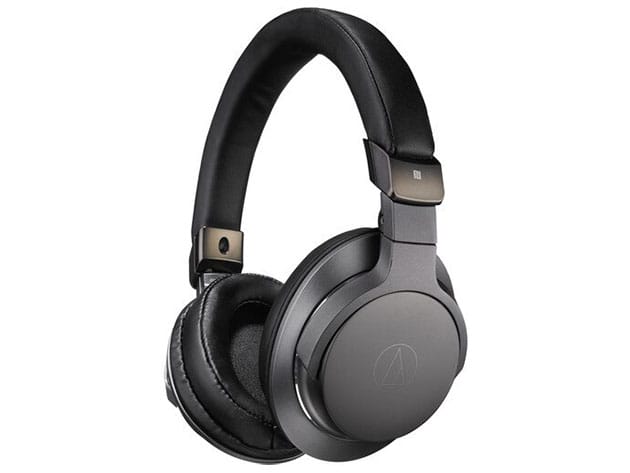


KEY FEATURES
Enjoy the best of both worlds with the ATH-SR6BT Wireless Over-Ear Headphones from Audio-Technica. This pair of headphones gives you the ability to enjoy your favorite audio wirelessly via Bluetooth technology for up to 30 hours, or through a traditional wired connection. The headphones are compatible with Qualcomm aptX, AAC and SBC codecs, and connect easily with smartphones, tablets, music players, and other devices. The pair’s comfortable over-ear design provides excellent sound isolation for the best listening experience in both wireless and wired modes. When traveling, the earcups fold in on the headband for a space-saving fit in the included carrying pouch.
- Supports NFC tech to quickly pair your mobile devices by simply touching or bringing your device within an inch near the headphones
- Provides both wired & wireless connectivity
- Foldable design for easier storage & transport
- Over-ear design provides additional benefit of passively isolating ambient noise
- LED in the left earcup gives visual indication of Bluetooth pairing, connection, charging, and battery level status
PRODUCT SPECS
Specs
- Color: black
- Product dimensions: 9.7″ x 8.9″ x 4.1″
- Weight: 1.85 lbs
- Driver size: 1.77″
- Design: over-ear
- Frequency response: 5Hz-40,000Hz (wired), 20Hz-20kHz (wireless)
- Sensitivity: 100dB
- Impedance: 39 Ohms
- Maximum power handlingL 1,500mW
- Foldable
- Mic type: condenser
- Mic pickup pattern: omnidirectional
- Wireless connectivity: Bluetooth 4.1, NFC
- Wired connectivity
- Audio connector to source: 1/8″ / 3.5 mm TRRS Right-Angled
- Cable length: 3.9′
- Charging port: Micro-USB
- Runtime: 30 hours (BT), 1,000 hours (standby)
- Recharge time: 5 hours
- LED indicator
- Model number: ATH-SR6BTBK
- Manufacturer’s 1-year warranty
Includes
- Audio-Technica Wireless Over-Ear Hi-Res Headphones (Black)
- Aux cable
- Charging cable
- Carrying case
- Quick setup guide

Marco / admin / 30 Nov
Writing day to day ramblings about making money, business, technology, sharing awesome deals and everything else that I know I'll forget. Follow my personal blog https://marcotran.com.au
I've recently also turned Vegan and started this website Veggie Meals - check it out
"When technology speaks for itself, that is art" - MT
Affiliate Compensated: there are some articles with links to products or services that I may receive a commission.
OTHER ARTICLES YOU MAY LIKE

USING THE LATEST CLAUDE MODEL TO BUILD GREAT TOOLS
If you have ever had an idea for a small tool but stopped because coding felt too hard, the latest Claude model makes that gap much smaller. You can now describe what you want in plain English, ask Claude to plan it, build the first version, improve the design, write the logic, test the workflow, […]
read more
REVIEWING AND UNBOXING THE TOOCKI USB-C RIGHT ANGLE 1.2M CABLE
USB C cables are among the most ordinary accessories we own, yet they can make a surprisingly noticeable difference to how comfortable our devices are to use while charging. The Toocki USB C right angle cable is a good example of a simple accessory that tries to solve a very common irritation, because instead of […]
read more

