
HOW TO DISABLE WORDPRESS SLIDER REVOLUTION ON MOBILE
August 12, 2019 / by Marco / Categories : Business, Technology, website, wordpress
For those of you who are using WordPress and the Slider Revolution plugin, did you know there is a way to disable displaying the Slider Revolution on mobile? The Slider Revolution looks great on desktop but sometimes for mobiles, the experience isn’t the greatest due to the width size (text can often become too small). So for those of you who want to disable this on your WordPress site just follow these steps:
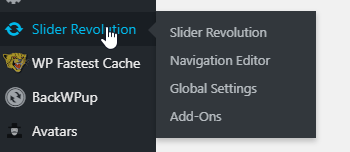
- Click on Slider Revolution

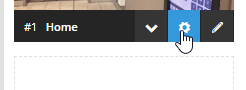
- Select the Slider Setting icon (wheel icon) when you hover on the Slider you want to disable

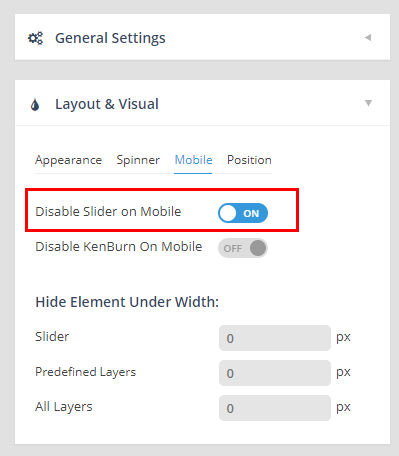
- Select Layout & Visual and click on the Mobile tab
- Click on the toggle button so that the Disable Slider on Mobile is set to ON

- Click on the Save button – green button
Clear the cache and then test on a mobile device (you can use the browser developer tools). Hope this helped and if it did share it on Social Media.

Marco / admin / 30 Nov
Writing day to day ramblings about making money, business, technology, sharing awesome deals and everything else that I know I'll forget. Follow my personal blog https://marcotran.com.au
I've recently also turned Vegan and started this website Veggie Meals - check it out
"When technology speaks for itself, that is art" - MT
Affiliate Compensated: there are some articles with links to products or services that I may receive a commission.
OTHER ARTICLES YOU MAY LIKE

USING THE LATEST CLAUDE MODEL TO BUILD GREAT TOOLS
If you have ever had an idea for a small tool but stopped because coding felt too hard, the latest Claude model makes that gap much smaller. You can now describe what you want in plain English, ask Claude to plan it, build the first version, improve the design, write the logic, test the workflow, […]
read more
REVIEWING AND UNBOXING THE TOOCKI USB-C RIGHT ANGLE 1.2M CABLE
USB C cables are among the most ordinary accessories we own, yet they can make a surprisingly noticeable difference to how comfortable our devices are to use while charging. The Toocki USB C right angle cable is a good example of a simple accessory that tries to solve a very common irritation, because instead of […]
read more


