
HOW TO FIX A REBOOTING OR STUCK TP-LINK ROUTER W8960N – I WISH I KNEW THIS EARLIER
February 25, 2017 / by Marco / Categories : Hardware, Technology
The Internet goes down! What do you do? I was in this situation just recently and when I checked my TP-Link router, model W8960N I noticed it was constantly rebooting. All the lights were flashing and it kept going into a loop. My heart sank when this happened as I knew my router was dying on me and I needed to go out and buy a new router.
When this happened, my kids and wife yelled out that the Internet was down and if felt like I was being savagely hunted down by predators. Luckily, I did the next logical thing, and it was to find an old ADSL modem (Billion) and got the Internet working again but the WiFi was slow because it only supported 802.11g
I decided to determine whether the TP-LINK router was recoverable so I decided to reset the router to factory defaults. This didn’t work. I then decided to leave the router turned off overnight. When I tried again in the morning all the LED lights on the TP-LINK router were on and it was flickering. I noticed the flickering could have been related to the amount of power going into the router so I decided to see if the power supply was the issue.
So on the back of the router, I checked to see what the power and current were required for the power supply. The power supply needed to provide an output of 12V with 1A as shown in the below photo:
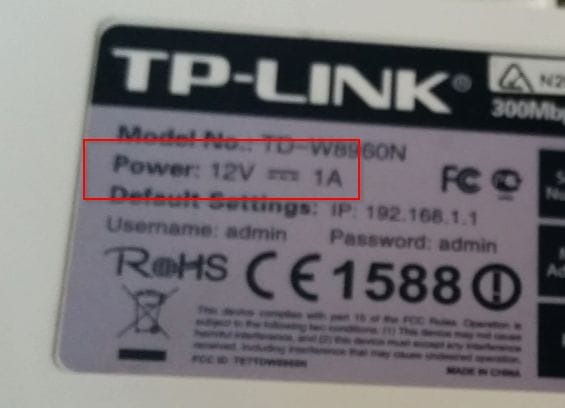
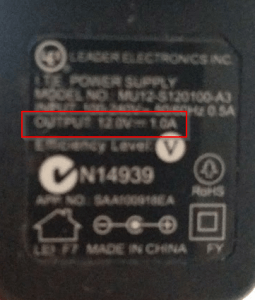
This was the original power supply.
Now you need to make sure you buy or find another power supply that has the same voltage and current. I found one from some old Creative speakers and it was a perfect match:
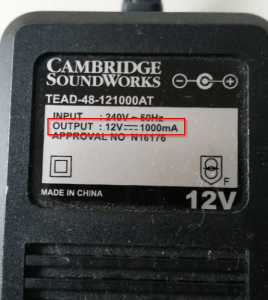
When I tried the power supply, it was like magic – the router worked again and I saved buying a new router.
Here’s a video I captured of the problem and the fix. I wish I knew this earlier as it has happened to me in the past. I captured the video with the 360fly 4K in POV (Point of View Mode). You can buy the 360 camera here:
Our Sponsors
- Advertise Me Pty Ltd

Digital Signage Solutions
- Fitness Mania
Everything to do with fitness products ranging from gym equipment, fitness clothing, protein powder and lots more.
- My Healthy App
My Healthy App curates all the best and latest mobile health apps.




Marco / admin / 30 Nov
Writing day to day ramblings about making money, business, technology, sharing awesome deals and everything else that I know I'll forget. Follow my personal blog https://marcotran.com.au
I've recently also turned Vegan and started this website Veggie Meals - check it out
"When technology speaks for itself, that is art" - MT
Affiliate Compensated: there are some articles with links to products or services that I may receive a commission.
OTHER ARTICLES YOU MAY LIKE

REVIEWING AND UNBOXING THE TOOCKI USB-C RIGHT ANGLE 1.2M CABLE
USB C cables are among the most ordinary accessories we own, yet they can make a surprisingly noticeable difference to how comfortable our devices are to use while charging. The Toocki USB C right angle cable is a good example of a simple accessory that tries to solve a very common irritation, because instead of […]
read more
SUPABASE BACKUP TUTORIAL: USE DBEAVER TO EXPORT YOUR DATABASE SAFELY
If you are building anything serious on Supabase, whether that is a client portal, a SaaS app, an internal dashboard, or even a small side project that is starting to get traction, having a reliable database backup process is one of those tasks that quickly moves from optional to essential. Supabase makes a lot of […]
read more


