
Best way to stop crawler bots
March 26, 2015 / by Marco / Categories : Technology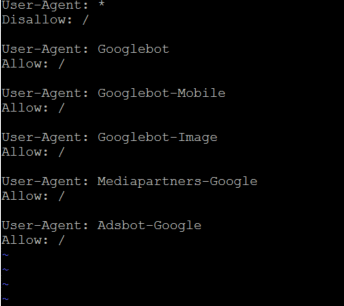
I recently discovered one of my VPS servers was running constantly at 1-2 CPU load and received notifications from the VPS provider that it was using more than my fair share of CPU resources and temporarily suspended the VPS to prevent it from impacting my neighbouring customers – which was fair enough.
Upon investigation there were several reasons why the CPU load was high and one of them being that the sight was being crawled by different bots, Google, Bing, Yahoo, Ahref, Yandex, Twitter and the list goes on. So in order to reduce the load I decided to investigate what the best way was to prevent all the bots except for Google to crawl through my websites (please note that on the same VPS I’m hosting multiple websites).
After some researching and testing, the best way I was able to stop all bots except for Google was to include the following in the robots.txt file:
User-Agent: *
Disallow: /
User-Agent: Googlebot
Allow: /
User-Agent: Googlebot-Mobile
Allow: /
User-Agent: Googlebot-Image
Allow: /
User-Agent: Mediapartners-Google
Allow: /
User-Agent: Adsbot-Google
Allow: /
I know some people may ask “Why only allow Google?” The answer to this question is because that’s the only search engine that I’ve noticed that has the highest referral visitors to my websites. I don’t see the point of having the other crawlers use up CPU and resources which could potentially slow down the website and I’d rather keep the website nice and clean with minimal user traffic. Also, I’ve noticed other crawlers are used for competitor analysis which I don’t really use.
Do you have any other tips? Is this the best way to do this? If you have any other tips please let me know.

Marco / admin / 30 Nov
Writing day to day ramblings about making money, business, technology, sharing awesome deals and everything else that I know I'll forget. Follow my personal blog https://marcotran.com.au
I've recently also turned Vegan and started this website Veggie Meals - check it out
"When technology speaks for itself, that is art" - MT
Affiliate Compensated: there are some articles with links to products or services that I may receive a commission.
OTHER ARTICLES YOU MAY LIKE

REVIEWING AND UNBOXING THE TOOCKI USB-C RIGHT ANGLE 1.2M CABLE
USB C cables are among the most ordinary accessories we own, yet they can make a surprisingly noticeable difference to how comfortable our devices are to use while charging. The Toocki USB C right angle cable is a good example of a simple accessory that tries to solve a very common irritation, because instead of […]
read more
SUPABASE BACKUP TUTORIAL: USE DBEAVER TO EXPORT YOUR DATABASE SAFELY
If you are building anything serious on Supabase, whether that is a client portal, a SaaS app, an internal dashboard, or even a small side project that is starting to get traction, having a reliable database backup process is one of those tasks that quickly moves from optional to essential. Supabase makes a lot of […]
read more

