
How do I maintain the image proportions when I resize my images in Photoshop?
August 21, 2012 / by Marco / Categories : Software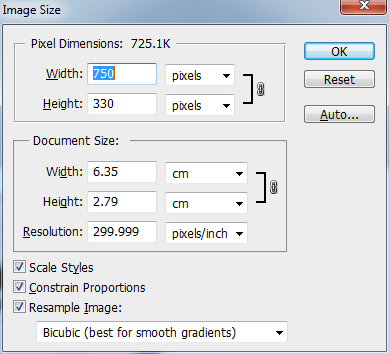
The best way to resize an image it to ensure the image proportions are maintained, otherwise the image may look stretched or weird. When using photoshop, you can use the Image size function. You just have to make sure Constraints proportions is selected: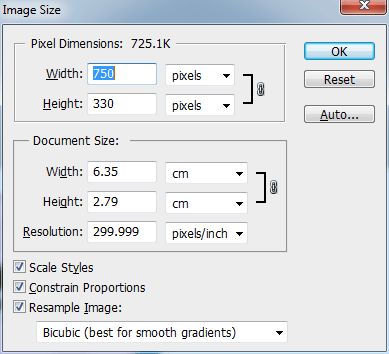
Alternatively, you can select the image then press CTRL-T and drag the corners. But before dragging the corners you need to make sure the proportions are locked by clicking on the lock button as shown below:

If you’re just a beginner for photoshop you may want to download this free PDF book which will instantly improve your photoshop skills:


Marco / admin / 30 Nov
Writing day to day ramblings about making money, business, technology, sharing awesome deals and everything else that I know I'll forget. Follow my personal blog https://marcotran.com.au
I've recently also turned Vegan and started this website Veggie Meals - check it out
"When technology speaks for itself, that is art" - MT
Affiliate Compensated: there are some articles with links to products or services that I may receive a commission.
OTHER ARTICLES YOU MAY LIKE
FILMORA 15.2.3 UPDATE: DID IT FIX PLAYBACK JITTER? A PRACTICAL TEST WITH GPU SETTINGS
Wondershare Filmora has received a new point release, and for many editors the first question is simple. Has this update finally fixed that annoying playback jitter in the preview window. If you have felt a stutter during editing that makes your footage look as if frames are being skipped or shuffled rather than played smoothly, […]
read more
FILMORA 15 – WHAT’S NEW? AI EXTEND, DYNAMIC CAPTIONS, TRUE TIMELINE EDITING + INSTALL GUIDE
There is a particular thrill to installing a major new release of your everyday editor, especially when your workflow is comfortable and productive in the current version. That feeling is right at the heart of the move from Filmora 14 to Filmora 15. This upgrade promises fresh creative features, faster handling of complex projects, and […]
read more

