
WooCommerce Remove Free Price Plugin
December 10, 2014 / by Marco / Categories : Business, Free, Technology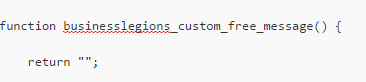
If you’re running WooCommerce on your WordPress site, have you ever seen this on your website? Yes the word FREE! is displayed on your products if the price value is 0. This can happen if you forget to add a price or if you use an importing tool and the source data feed doesn’t have a value specified for the price. This may happen if you have an affiliate marketing store and build affiliate stores.
 :
:
Have no fear. I had someone create a plugin for me that removed the word free… because on my eCommerce website I don’t give anything away for free so it made sense I completely removed this.
The plugin is very simple to install. All you have to do is download and install the plugin like all the other plugins. At the moment, the plugin completely removes the word FREE, so if you wanted to replace this word with something else, then follow these instructions after installing the plugin:
– Click on Plugins
– Then click on Editor
– At the top right hand section click on the dropdown and select WooCommerce Remove Free Price, then click Select

– Then look for the line that has return “”; like shown below:
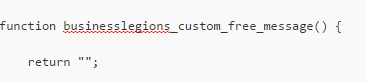
– Now add the text that you want to use in between the “” . For example “Contact Us”
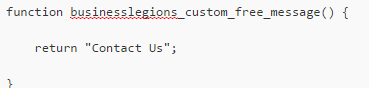
– Click Update and test. You will see now that the text is changed to Contact Us.

Hope this plugin helps.
You can download the plugin here:


Marco / admin / 30 Nov
Writing day to day ramblings about making money, business, technology, sharing awesome deals and everything else that I know I'll forget. Follow my personal blog https://marcotran.com.au
I've recently also turned Vegan and started this website Veggie Meals - check it out
"When technology speaks for itself, that is art" - MT
Affiliate Compensated: there are some articles with links to products or services that I may receive a commission.
OTHER ARTICLES YOU MAY LIKE

USE FUSEBASE TO AUTOMATE TEAMWORK AND COLLABORATION
If your business is growing, your team is juggling too many moving parts, and your client communication is spread across email threads, chat apps, documents, task boards, and endless follow ups, there is a good chance the real problem is not effort but fragmentation. Most businesses do not lose time because people are lazy. They […]
read more
USING REAP FOR VIDEO CLIPS
Short form video is now one of the most effective ways to reach new audiences, grow brand awareness, and turn long form content into a steady stream of social media assets. For creators, marketers, consultants, educators, and business owners, the challenge is rarely a lack of content. The real problem is time. Editing long videos […]
read more

