
How to disable Java was blocked because its out of date message
March 5, 2015 / by Marco / Categories : Google, Technology
If you run an old version of Java and found it more stable than the latest version Chrome will keep bugging you to update the plugin. This prevents the Java app to run and can be very annoying. Here’s the example message:

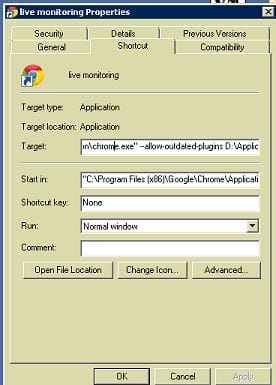
One way to disable to disable this message from appearing is to use the command switch –allow-outdated-plugins with the Chrome.exe file. What you can do is create a shortcut pointing with the following:
“C:\Program Files (x86)\Google\Chrome\Application\chrome.exe” –allow-outdated-plugins (note there are two dashes before allow)
Below is an example:

Marco / admin / 30 Nov
Writing day to day ramblings about making money, business, technology, sharing awesome deals and everything else that I know I'll forget. Follow my personal blog https://marcotran.com.au
I've recently also turned Vegan and started this website Veggie Meals - check it out
"When technology speaks for itself, that is art" - MT
Affiliate Compensated: there are some articles with links to products or services that I may receive a commission.
OTHER ARTICLES YOU MAY LIKE

WHEN TO HIRE YOUR FIRST EMPLOYEE (AND WHEN NOT TO)
For many entrepreneurs, hiring the first employee is a major milestone. It represents growth, momentum, and the possibility that your business is evolving from a solo operation into something larger. At the same time, it can feel intimidating. Bringing someone onto your team introduces new responsibilities, financial commitments, and operational challenges. The decision to hire […]
read more
USE THESE TOOLS TO BUILD YOUR BUSINESS
Building a business has never been short on ambition, but it has often been short on time, budget, and operational headroom. Founders are expected to market like a media team, sell like a seasoned closer, support customers around the clock, manage projects with precision, and still find space to think strategically. That is exactly why […]
read more

