
XCODE ISSUE UPLOADING TO ITUNES APP STORE THIS CERTIFICATE HAS AN INVALID ISSUER
June 27, 2016 / by Marco / Categories : App Development, iPhone, Technology
I tried uploading a new build of my app to the iTunes App store and received the error message “This Certificate has an invalid issuer”. After researching on the Internet an article recommended to delete the WWDR Certificate from the Keychain and install the latest one as it expired on February 14,2016. I thought I followed the instructions and it didn’t work, but after carefully reading the instructions again, I realised it was my fault for failing to follow each step.
Here’s a the steps I used:
- Open up the Keychain Access program on your Mac
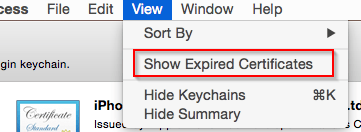
- Click on View then Show Expired Certificates

- Now this is important. Click on System on the left hand side. It will default to login so make sure you click on System.

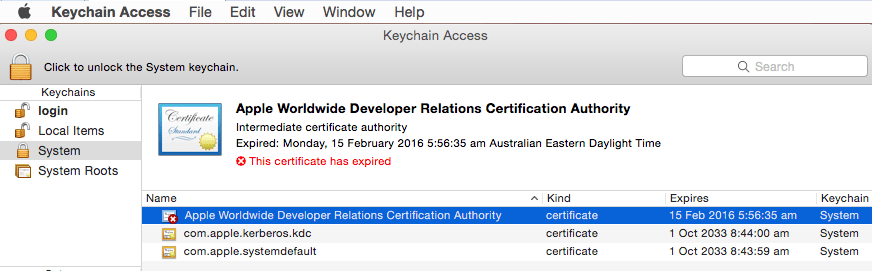
- Delete Apple Worldwide Developer Relations Certificate Authority. You will notice that it expires on the 15 Feb 2016.

- Click here to download the new Apple WWDR Certificate.
- Then import it into the Keychain

- To make sure it worked click on on the iPhone Developer certificate and make sure it says “This certificate is valid”. If it’s invalid then it means the WWDRC is still not valid and you will need to make sure it’s deleted and imported again.
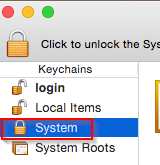
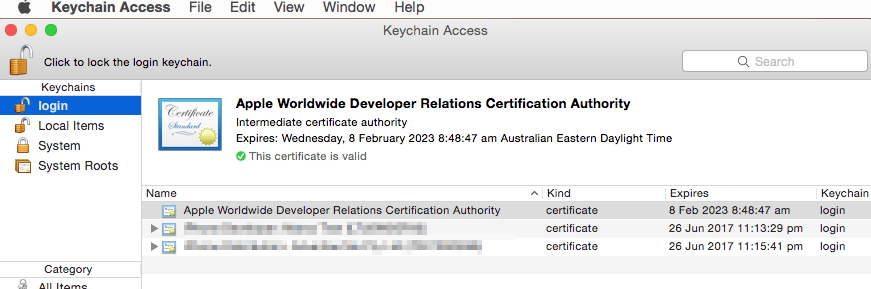
This will fix the problem. My mistake was that I deleted the certificate in the login keychain rather than System. Hopefully this fix will help you. If not let me know in the comments and I’ll try to help you.

Marco / admin / 30 Nov
Writing day to day ramblings about making money, business, technology, sharing awesome deals and everything else that I know I'll forget. Follow my personal blog https://marcotran.com.au
I've recently also turned Vegan and started this website Veggie Meals - check it out
"When technology speaks for itself, that is art" - MT
Affiliate Compensated: there are some articles with links to products or services that I may receive a commission.
OTHER ARTICLES YOU MAY LIKE

WHEN TO HIRE YOUR FIRST EMPLOYEE (AND WHEN NOT TO)
For many entrepreneurs, hiring the first employee is a major milestone. It represents growth, momentum, and the possibility that your business is evolving from a solo operation into something larger. At the same time, it can feel intimidating. Bringing someone onto your team introduces new responsibilities, financial commitments, and operational challenges. The decision to hire […]
read more
USE THESE TOOLS TO BUILD YOUR BUSINESS
Building a business has never been short on ambition, but it has often been short on time, budget, and operational headroom. Founders are expected to market like a media team, sell like a seasoned closer, support customers around the clock, manage projects with precision, and still find space to think strategically. That is exactly why […]
read more

