How to capture video and audio with Adobe Captivate
November 13, 2012 / by Marco / Categories : Technology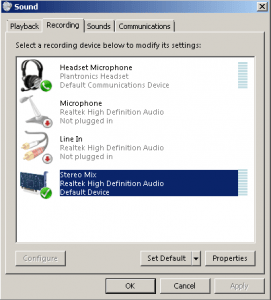
I started playing with Adobe Captivate today and found it very useful for creating video presentations and video tutorials. You basically capture an area of your screen and it will save it into a video file that can be uploaded to Youtube or Vimeo.
I could capture video fine, but for some reason the capture that I was doing also had audio but it didn’t capture it for some reason.
After digging around, I needed to make sure your PC/Laptop has the Stereo Mix device listed in the Sound Recording devices.
- To check whether you have this enabled, right click on your speaker icon in the task bar.
- Select Recording Devices
- Check to see whether Stereo Mix is listed.
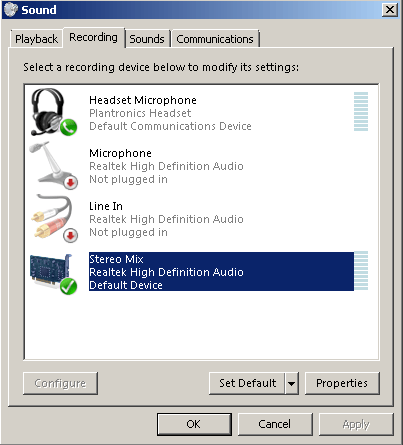
- If it’s not listed, then install the latest drivers for your particular audio card (I had to do this in order for the Stereo Mix to appear).
- If Stereo Mix device is listed enable it and then perform some tests.
- Once you have enable the Stereo Mix device, create a new Adobe Captivate Project.
- Click the record button and in the audio section select Volume (Stereo Mix…)
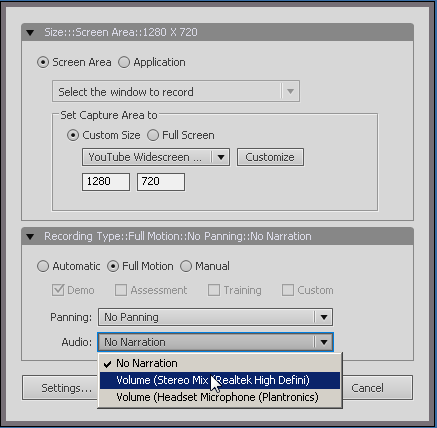
That’s it! You should now be able to record video and audio.
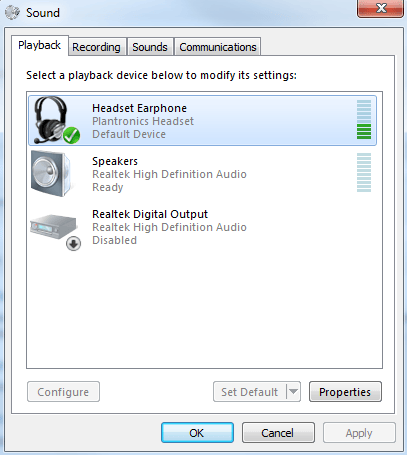
NOTE: In order to use the Stereo Mix, you need to make sure your internal speakers are set to the default communication device like below:
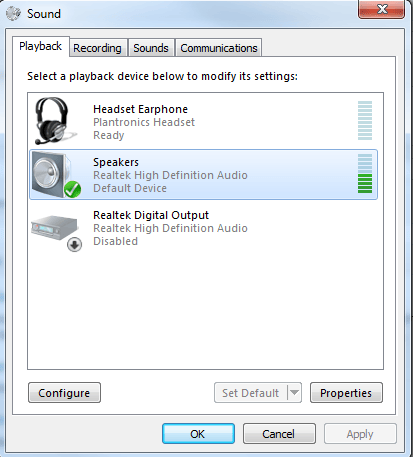
If you have an external headset like the below configuration it will not work.

Marco / admin / 30 Nov
Writing day to day ramblings about making money, business, technology, sharing awesome deals and everything else that I know I'll forget. Follow my personal blog https://marcotran.com.au
I've recently also turned Vegan and started this website Veggie Meals - check it out
"When technology speaks for itself, that is art" - MT
Affiliate Compensated: there are some articles with links to products or services that I may receive a commission.
OTHER ARTICLES YOU MAY LIKE
REVIEWING AND UNBOXING THE TOOCKI USB-C RIGHT ANGLE 1.2M CABLE
USB C cables are among the most ordinary accessories we own, yet they can make a surprisingly noticeable difference to how comfortable our devices are to use while charging. The Toocki USB C right angle cable is a good example of a simple accessory that tries to solve a very common irritation, because instead of […]
read more
SUPABASE BACKUP TUTORIAL: USE DBEAVER TO EXPORT YOUR DATABASE SAFELY
If you are building anything serious on Supabase, whether that is a client portal, a SaaS app, an internal dashboard, or even a small side project that is starting to get traction, having a reliable database backup process is one of those tasks that quickly moves from optional to essential. Supabase makes a lot of […]
read more