
LinkedIn Issue not displaying description and image from WordPress
June 3, 2014 / by Marco / Categories : Business, Software
So I tried sharing a WordPress blog post on LinkedIn and discovered that LinkedIn wasn’t displaying the description and thumbnail image from the Open Graph meta tags. I thought it could have been the actual post, so I tried different posts and received the same results.
WAS THE ISSUE WITH LINKEDIN?
No, but firstly let me explain how I worked out it wasn’t related to LinkedIn. After some digging around the best way to troubleshoot the issue was to use the Facebook debug tool. This tool debugs the Open Graph tags, so if there’s an error reported then most likely this would be the cause.
Here was the result:

WEBSITE PAGE SOURCE
Basically, the result reported that there was multiple OG URL’s specified. So what I had to do is actually look at the website’s page source code. Upon reviewing the source code, indeed there were duplicate OG tags. To check your website’s page source code, just right click and select “view page source”.
WORDPRESS
So the issue was within WordPress. To narrow it down, have a look at the source code and determine whether it’s generated by the plugin or the theme. I am using the Yoast SEO plugin which by default generates the OG tags and upon further inspection the theme (single.php) page had this code:
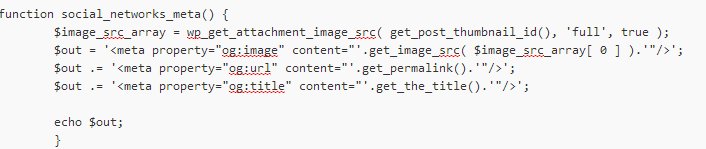
So upon deleting this section of the code and retesting using the Facebook debug tool, the problem was fixed – LinkedIn displayed the thumbnail and the description.
Hopefully this helps someone solve their issue.
Our Sponsors
- Advertise Me Pty Ltd

Digital Signage Solutions


Marco / admin / 30 Nov
Writing day to day ramblings about making money, business, technology, sharing awesome deals and everything else that I know I'll forget. Follow my personal blog https://marcotran.com.au
I've recently also turned Vegan and started this website Veggie Meals - check it out
"When technology speaks for itself, that is art" - MT
Affiliate Compensated: there are some articles with links to products or services that I may receive a commission.
OTHER ARTICLES YOU MAY LIKE
HOW TO USE GOOGLE WORKSPACE STUDIO FLOW IN GMAIL FOR SMART EMAIL AUTOMATION
Google keeps slipping new productivity features into Workspace, and sometimes the most useful ones are the tools you almost discover by accident while checking email. That is exactly the case with Studio Flow, a feature that has started appearing inside Gmail and wider Google Workspace environments, and it looks like Google is pushing further into […]
read more
USE FUSEBASE TO AUTOMATE TEAMWORK AND COLLABORATION
If your business is growing, your team is juggling too many moving parts, and your client communication is spread across email threads, chat apps, documents, task boards, and endless follow ups, there is a good chance the real problem is not effort but fragmentation. Most businesses do not lose time because people are lazy. They […]
read more

