
Solved: Can’t connect to local MySQL server through socket ‘/var/lib/mysql/mysql.sock’
June 28, 2015 / by Marco / Categories : Technology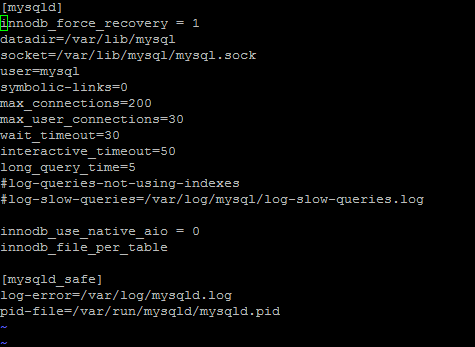
My VPS server experienced an issue with mySQL server and thought I’d better document how to resolve it in case it happens again.
The symptoms
- An Error message saying unable to connect to the database comes up when trying to access websites using WordPress
- Manually starting the mysqld came back with “Failed”- using the command


service mysqld restart- Rebooting didn’t fix the problem
- When trying to run “mysql” an error message came back with
The solution
For some reason this worked for me – it may not work for you. All you have to do is run the database in recovery mode so follow these instructions:
SSH into your VPS server
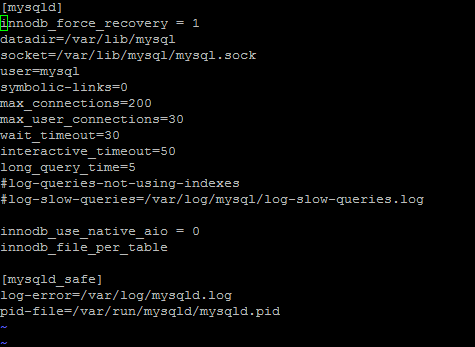
Edit the my.cnf file in the folder /etc and add the following line:
innodb_force_recovery = 1Then save the file
Restart mysqld by using the following command:
service mysqld restartIt should now work. If the server started with OK then it worked.
Go back and disable the innodb recovery by either removing the line or just adding a # at the front.
Hopefully this has fixed your issue.
More information about innodb force recovery: Click here

Marco / admin / 30 Nov
Writing day to day ramblings about making money, business, technology, sharing awesome deals and everything else that I know I'll forget. Follow my personal blog https://marcotran.com.au
I've recently also turned Vegan and started this website Veggie Meals - check it out
"When technology speaks for itself, that is art" - MT
Affiliate Compensated: there are some articles with links to products or services that I may receive a commission.
OTHER ARTICLES YOU MAY LIKE

REVIEWING AND UNBOXING THE TOOCKI USB-C RIGHT ANGLE 1.2M CABLE
USB C cables are among the most ordinary accessories we own, yet they can make a surprisingly noticeable difference to how comfortable our devices are to use while charging. The Toocki USB C right angle cable is a good example of a simple accessory that tries to solve a very common irritation, because instead of […]
read more
SUPABASE BACKUP TUTORIAL: USE DBEAVER TO EXPORT YOUR DATABASE SAFELY
If you are building anything serious on Supabase, whether that is a client portal, a SaaS app, an internal dashboard, or even a small side project that is starting to get traction, having a reliable database backup process is one of those tasks that quickly moves from optional to essential. Supabase makes a lot of […]
read more

