
CHANGING DOCUMENT ROOT IN VESTACP WEBSITES
September 24, 2018 / by Marco / Categories : Business
The best way I have found to change the Document Root for specific websites in VestaCP is to create a new Web Template for each domain. I previously edited the document root path in the config file for each for each domain but when NGINX or the server restarted it would revert back to the default: root /home/admin/web/domain.com/public_html/;
I needed the root path to be this:
root /home/admin/web/domain.com/public_html/public;
So here are the instructions on how to fix this permanently (I’m using a Virtual Private Server from Chicago VPS rather than a shared server). My VPS setup uses VestaCP with php-fpm and NGINX:
- Login to your VPS
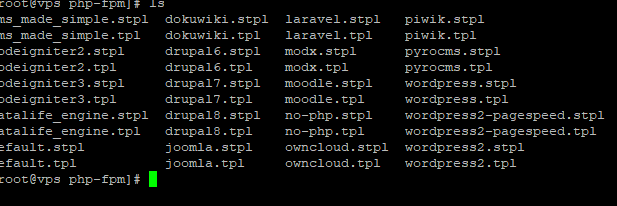
- Go to the web templates locate in /usr/local/vesta/data/templates/web/nginx/php-fpm/
If you’re using apache then the path is /usr/local/vesta/data/templates/web/httpd and you need to edit the default.tpl and default.stpl files
- Create two new templates with your domain name in the filename. E.g copy the two wordpress2 templates as follows:
- cp wordpress2.stpl wordpress2-domainname.stpl
- cp wordpress2.tpl wordpress2-domainname.tpl
- NOTE: stpl is the template used for SSL. So if you intend to use SSL make sure you also copy the stpl file.
- Edit each file and modify the root path
- vi wordpress2-domainname.stpl
- Edit the root path and then save the file
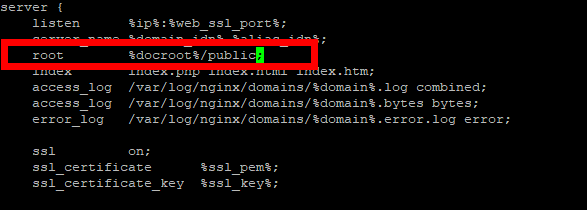
- In this particular case the default %docroot% variable is set to /home/admin/web/domainname/public_html/ (where domainname is the web domain name)
- Do the same to vi wordpress2-domainname.tpl
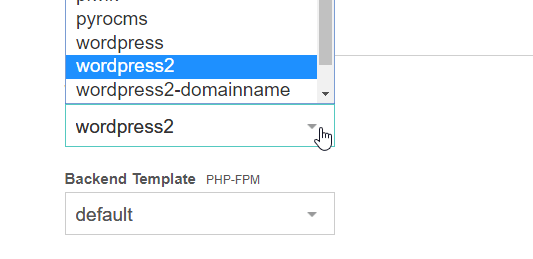
- Login to your VestaCP dashboard and click on Web – your domain name. In the Web Template (NGINX) select the new template you created:
- That’s it, the document root for that particular domain will be permanently set to the folder you specified. Hope this helped and if it did please share it or leave me a comment.

Marco / admin / 30 Nov
Writing day to day ramblings about making money, business, technology, sharing awesome deals and everything else that I know I'll forget. Follow my personal blog https://marcotran.com.au
I've recently also turned Vegan and started this website Veggie Meals - check it out
"When technology speaks for itself, that is art" - MT
Affiliate Compensated: there are some articles with links to products or services that I may receive a commission.
OTHER ARTICLES YOU MAY LIKE

REVIEWING AND UNBOXING THE TOOCKI USB-C RIGHT ANGLE 1.2M CABLE
USB C cables are among the most ordinary accessories we own, yet they can make a surprisingly noticeable difference to how comfortable our devices are to use while charging. The Toocki USB C right angle cable is a good example of a simple accessory that tries to solve a very common irritation, because instead of […]
read more
QUICK FIX TO CHANGE THE MAX SELL POWER TO LESS THAN 500W ON THE DEYE INVERTER
There are many reasons a home owner or installer might want to place a tight cap on how much solar power is exported to the public grid. Some households live under a strict export cap imposed by their local distribution network operator, others want to reduce export to focus on self consumption and battery charging, […]
read more

