
CHROME KIOSK MODE
December 5, 2015 / by Marco / Categories : Google, Technology
The latest version of Chrome v46 has fixed a major issue with the Kiosk mode feature! I previously wrote about How to setup Chrome Kiosk Mode then I wrote several other articles on how to fix a few issues with Chrome Kiosk mode. Here’s the list:
- Right clicking still displayed the context menu. I solved this issue here: How to disable the right lick for a kiosk website
- Developer mode was still enabled by pressing Control-Shift-J. I solved this issue here: How to disable chrome developer tools
- If Chrome crashed or was restarted without a proper shutdown it would always display a restore message: I solved this issue here: How to disable the restore message in Chrome
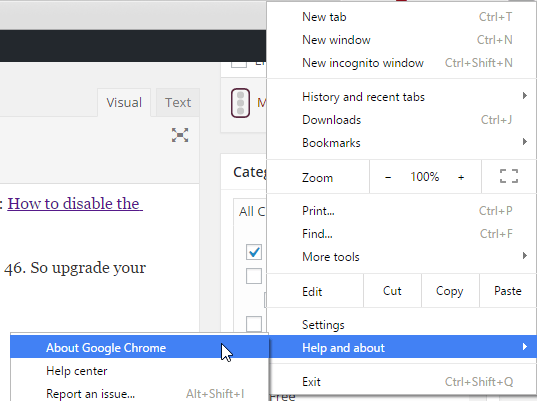
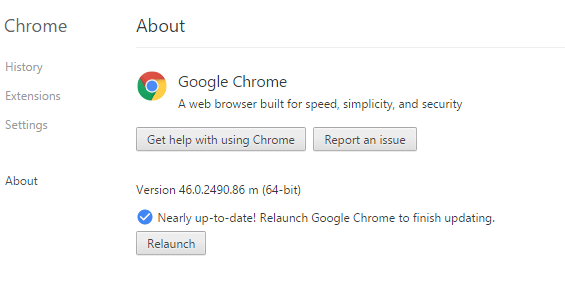
After a lot of complaining from the Google Chrome community, all the above issues were resolved/fixed in the latest version of Chrome 46. So upgrade your Chrome version now! The easiest way to upgrade Chrome is to click on the Menu, hover to Help and about – About Google Chrome:

Marco / admin / 30 Nov
Writing day to day ramblings about making money, business, technology, sharing awesome deals and everything else that I know I'll forget. Follow my personal blog https://marcotran.com.au
I've recently also turned Vegan and started this website Veggie Meals - check it out
"When technology speaks for itself, that is art" - MT
Affiliate Compensated: there are some articles with links to products or services that I may receive a commission.
OTHER ARTICLES YOU MAY LIKE
FILMORA 15.2.3 UPDATE: DID IT FIX PLAYBACK JITTER? A PRACTICAL TEST WITH GPU SETTINGS
Wondershare Filmora has received a new point release, and for many editors the first question is simple. Has this update finally fixed that annoying playback jitter in the preview window. If you have felt a stutter during editing that makes your footage look as if frames are being skipped or shuffled rather than played smoothly, […]
read more
STOP NOISY CALLS: THE ANDROID SETTING YOU SHOULD SWITCH ON TODAY
Phone calls still matter. Whether you’re speaking to a client, checking in with family, or handling something urgent on the move, clarity can make or break the conversation. If you’ve ever found yourself apologising for the construction noise behind you, the wind across your microphone, or the café chatter muddling your words, there’s an Android […]
read more

