
Issue with TightVNC Web Viewer and Chrome v43
May 22, 2015 / by Marco / Categories : Google, Software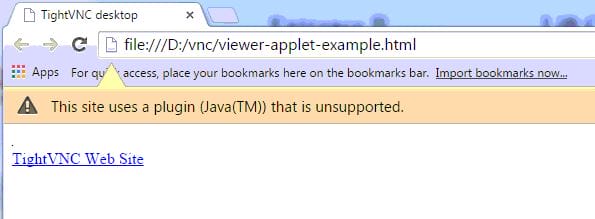
In a previous post, I wrote an article on how to get TightVNC Viewer Working in Java. The instructions worked well but just recently I tried using the same instructions on another computer and realised that running the TightVNC Web viewer using Chrome didn’t work. I spent hours trying to work out what the problem could be. I initially thought that maybe it was the computer I was using so I tried it on my laptop and had the same issue. Here’s what I kept getting when opening the viewer applet example.html file:
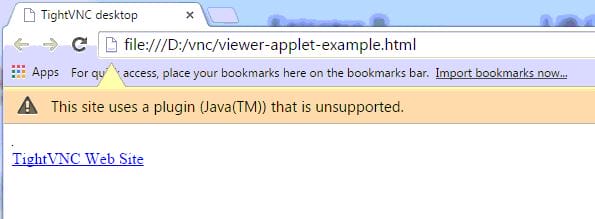
The error message was “This site uses a plugin (Java(TM)) that is unsupported. To troubleshoot the problem I tried a number of things. I tried reinstalling tightVNC which didn’t help. I then uninstalled Java and reinstalled it which didn’t work either. I then decided to reinstall Chrome and that didn’t fix the problem. I felt a bit frustrated so I decided to leave it for a few days and decided to come back to it… that was like a few weeks ago (yes I did forget about it). For some reason, today I decided to give it another go.
This time I paid a bit more attention at the issue. In the above screenshot you may not have noticed because I deliberately cropped the image but there is a Learn More button. Here what I mean:

I decided to click on this button and the answer on how to fix the issue was right there. The button went to the following site: https://support.google.com/chrome/answer/6213033
In the article it mentioned that NPAPI plugins (what ever that is) does not work in Chrome version 42 and above. So that got me a bit curious so I decide to login to the machine that I originally used that had TightVNC Web Viewer working and low and behold it was using Chrome version 41. That’s why it was working!!! NPAPI worked on that version.
Anyways as per the instruction the way to fix the issue it to enable NPAPI plugins and in order to do this:
- Open Chrome
- Type chrome://flags/#enable-npapi
- Then press enable


Test by running the example file (viewer applet example.html) and see if the error message comes up. If it does then it means that it’s fixed.

Marco / admin / 30 Nov
Writing day to day ramblings about making money, business, technology, sharing awesome deals and everything else that I know I'll forget. Follow my personal blog https://marcotran.com.au
I've recently also turned Vegan and started this website Veggie Meals - check it out
"When technology speaks for itself, that is art" - MT
Affiliate Compensated: there are some articles with links to products or services that I may receive a commission.
OTHER ARTICLES YOU MAY LIKE

HOW TO USE SPLIT VIEW IN GOOGLE CHROME
Google Chrome is full of useful features that many people never notice until they appear by accident during everyday browsing. One of those quietly helpful tools is Split View, a feature that makes it much easier to work with two tabs side by side in the same browser window. If you regularly compare documents, read […]
read more
FILMORA 15.2.3 UPDATE: DID IT FIX PLAYBACK JITTER? A PRACTICAL TEST WITH GPU SETTINGS
Wondershare Filmora has received a new point release, and for many editors the first question is simple. Has this update finally fixed that annoying playback jitter in the preview window. If you have felt a stutter during editing that makes your footage look as if frames are being skipped or shuffled rather than played smoothly, […]
read more

